API key abuse can lead to massive costs and service disruptions. If your Geocoding API key is exposed or exploited, attackers can quickly rack up thousands of euros in charges, exhaust usage quotas, and disrupt legitimate services. The risks are higher with pay-as-you-go models like Google Maps, where unprotected keys can cause financial and operational headaches.
To protect your API keys:
- Store keys securely: Use server-side storage, environment variables, or tools like AWS Secrets Manager.
- Restrict access: Set IP whitelisting, HTTP referrer restrictions, and service-specific permissions.
- Rotate keys regularly: Replace keys every quarter or immediately if compromised.
- Monitor usage: Track patterns, set alerts, and review logs for suspicious activity.
- Use backend proxies: Prevent direct key exposure in client-side code.
These steps minimize risks, safeguard your budget, and ensure uninterrupted service. Start implementing these measures today to avoid costly mistakes.
Best Practices for API Key Authentication in 2026
sbb-itb-823d7e3
Main Strategies to Prevent API Key Abuse
Protecting geocoding API keys requires a multi-layered approach that includes secure storage, access restrictions, and regular key rotation. This strategy helps prevent accidental exposure and reduces the risk of malicious exploitation.
Store API Keys Securely
Avoid embedding API keys in client-side code at all costs. Instead, store them on the server using environment variables or secure configuration files. For enhanced security, consider using dedicated key management tools like HashiCorp Vault, AWS Secrets Manager, or Google Cloud KMS. These solutions provide encryption at rest and offer fine-grained access controls, making them particularly effective for enterprise applications. Additionally, integrating secret scanning into your CI/CD pipeline can help catch unintentional exposures before they become an issue.
Another effective method is to adopt a backend proxy pattern. Here, the frontend communicates with your server, which attaches the API key before forwarding the request to the geocoding service. This ensures the key is never directly exposed to users. To prevent accidental commits, add sensitive files like .env to your .gitignore file. Also, ensure API keys are masked in application logs to avoid plaintext disclosure.
"API keys are essentially the username and password that authorise your application to access a service under your account. They should be treated with the same care as your login credentials for a bank account." – TheLinuxCode
Combining secure storage with strict access controls creates a strong foundation for protecting your API keys.
Use IP Whitelisting and Referrer Restrictions
In addition to secure storage, restricting access through IP whitelisting and referrer restrictions can significantly reduce exposure. For server-to-server communication, limit access to specific IP ranges (e.g., 198.51.100.0/24) using IPv4, IPv6, or CIDR notations. For web applications, enable HTTP referrer restrictions to ensure the API key only works when requests originate from authorised domains. Use wildcards (e.g., https://*.example.com/*) to accommodate variations in modern browser behavior.
For added security, pair these restrictions with API-level controls. For example, limit the key's functionality to a specific service, such as a Geocoding API. According to Apyflux, combining IP whitelisting with geofencing can reduce unauthorised API requests by up to 99%. Mobile applications can also benefit from platform-specific identifiers, such as Android package names with SHA-1 fingerprints or iOS bundle IDs, instead of relying solely on referrer restrictions.
"An unrestricted API key is a security incident waiting to happen. If someone gets hold of your key, they can use it from anywhere, for any API, and rack up charges on your billing account." – Nawaz Dhandala, OneUptime
Rotate and Invalidate Keys Regularly
Regularly rotating API keys limits the window of opportunity for attackers to exploit compromised credentials. A quarterly rotation schedule is often a good balance between security and operational convenience.
To ensure a smooth transition during rotation, use a phased approach: generate a new key, deploy it alongside the current one, monitor the migration process, and then revoke the old key - typically over a period of about eight days. If you suspect a key has been compromised, deactivate it immediately through your provider's dashboard.
Platforms like Google Maps allow you to create multiple API keys per project. This enables you to assign separate keys to different applications or environments, reducing the scope of impact if one key is exposed. These practices not only protect your geocoding services but also ensure uninterrupted and secure geodata delivery, which is critical for platforms like Zip2Geo.
Limiting API Key Functionality and Usage
Restricting the functionality of API keys helps contain the damage if a key is compromised. While securely storing keys is essential, limiting their capabilities adds another layer of protection. One effective approach is to define strict endpoint access for each API key.
Define Allowed API Endpoints
Assign each API key to a specific service. For example, a geocoding key should only have access to the Geocoding API. This separation ensures that even if a key is compromised, it can't be misused for more sensitive or costly operations. Google Cloud allows up to 300 API keys per project, making it easy to assign unique, restricted keys to different applications or environments. Regularly auditing keys and removing overly broad permissions is crucial for maintaining security.
Set Quota and Rate Limits
After restricting endpoint access, apply strict quotas and rate limits to minimize potential abuse. Quotas and rate limits act as financial safeguards. Per-second rate limits protect against sudden traffic surges and automated bots, while daily and monthly limits help prevent unexpected billing issues. For instance, the Google Maps Platform enforces a rate limit of 3,000 queries per minute for combined client-side and server-side requests.
To further reduce risks, configure multiple production keys with individual limits. This ensures that no single compromised key can deplete your entire account capacity. As Julian Simioni, CEO of Geocode Earth, explains:
"No one key can use up your entire account limit, meaning you've reduced the blast radius of any sort of issue: an aggressive crawler, a spike in real traffic, or that script you ran in development".
For development environments, allocate a small fraction of your total rate limit - typically around 10% of your production capacity. This prevents accidental overruns during testing from affecting live traffic.
Monitor and Log API Usage
Keep an eye on usage patterns to catch unauthorized access before it leads to financial or operational issues. Monitor key metrics like request volume, geographic origin, referrer URLs, and error rates. For example, a sudden traffic spike from a country where you don’t have users could indicate key theft.
Set up automated alerts for key usage thresholds, such as 90% of your daily quota, to manage resources proactively. Some providers even send email notifications when these limits are approached. Additionally, keep an eye out for frequent 403 (Forbidden) or 429 (Too Many Requests) errors, as they can signal bot activity attempting to bypass security measures. Maintaining detailed transaction logs is also essential for investigating breaches, helping you identify the source and scope of unauthorized access.
Handling Security Breaches and Compromised Keys
If you suspect an API key has been compromised, it’s crucial to act fast to stop any misuse. Start by deactivating the key through your provider's dashboard. This step will block attackers and prevent further charges from piling up.
After revoking the compromised key, create a new one and update all systems that rely on it. Use a straightforward approach: Create-Update-Delete. First, generate the new key. Then, update every system that uses it. Finally, delete the old key to avoid service interruptions. This ensures legitimate users won’t experience downtime during the transition.
Next, investigate how the breach happened. Dive into your API logs to see which endpoints were accessed, how many unauthorised requests were made, and where they came from. Look for vulnerabilities, such as a key hardcoded in client-side code, accidentally exposed in a public repository, or stored in an insecure location. Pinpointing the root cause is essential to fix the issue and avoid repeat incidents.
When setting up the replacement key, add restrictions right away. Use features like IP whitelisting, referrer limits, and API-specific rate limits. Store the new key securely, such as in environment variables or a vault like AWS Secrets Manager, instead of embedding it in your code. For mobile apps, route API calls through a backend server rather than embedding keys directly in the app. This method allows you to replace keys instantly without forcing users to download updates. Once the new key is secure and restricted, inform your teams to ensure everyone is on the same page.
Make sure to communicate the key replacement clearly to all relevant teams. This minimizes confusion and ensures everyone switches to the updated credentials. If you notice unexpected billing issues caused by the breach, reach out to your API provider for help with investigating the misuse or resolving billing disputes.
For Zip2Geo users, following these steps is essential to maintain secure and uninterrupted access to accurate geodata.
Security Considerations for Mobile Applications
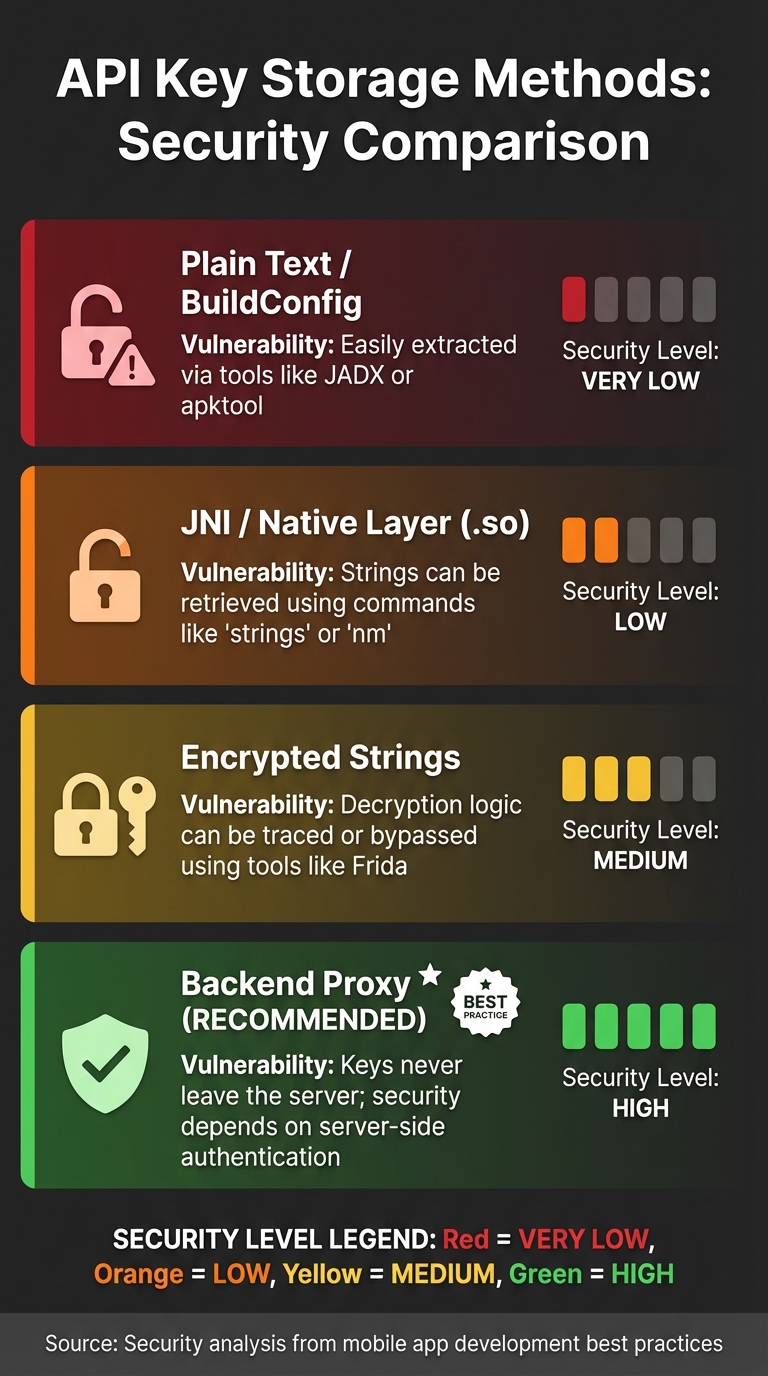
Mobile App API Key Storage Methods Security Comparison
Protecting your mobile app from security threats requires more than just avoiding key exposure. One effective step is implementing code obfuscation to make reverse engineering more difficult.
Avoid Embedding Keys in Client-Side Code
Mobile apps run on devices outside your control, which makes them vulnerable. Anyone can download your app's APK or IPA file and use tools like jadx or apktool to decompile it and extract hardcoded API keys. This isn't just a hypothetical risk - developers who unintentionally expose Google Maps API keys have faced unauthorized charges amounting to thousands of euros.
Storing keys in places like BuildConfig, resource files, or even the JNI layer (e.g., .so libraries) doesn't provide real security. Tools such as strings, nm, and Ghidra can easily retrieve these keys from the .rodata section. Additionally, attackers can use dynamic instrumentation tools like Frida to hook into your app during runtime and extract decrypted keys.
"Mobile apps can be downloaded from app stores by anyone, reverse engineered and the keys extracted." - Shona Hossell, Approov
A backend-first architecture is the most secure solution. This approach routes all API calls through your server, which acts as a proxy. The mobile app authenticates with your backend using short-lived tokens, while your server securely stores and uses the actual API keys. For example, with Zip2Geo, your app would request location data from your server, which then queries the Zip2Geo API on its behalf.
You can also enhance security with device attestation services, such as the Android Play Integrity API or iOS App Attest. These tools ensure that requests come from a legitimate, untampered version of your app.
While a backend-first strategy is crucial, adding layers like code obfuscation can further protect your app.
Implement Code Obfuscation Techniques
Code obfuscation is a defensive measure that complicates reverse engineering. Tools like ProGuard or R8 rename classes and methods, making it harder for attackers to identify sensitive parts of your app. However, obfuscation alone isn't enough. Android developer Rycco Atika emphasizes:
"No client-side method can guarantee absolute secrecy. The goal isn't to make secrets 'unstealable,' but to raise the cost of extraction".
Advanced techniques like polymorphic string encryption can also be used. These methods change the decryption algorithm with every build, making automated attacks more challenging. Even so, skilled attackers can still use tools like Frida to bypass static obfuscation by hooking into your app during runtime. For this reason, obfuscation works best when combined with other security measures, such as backend proxies, certificate pinning, and app attestation.
Here's a comparison of different storage methods for API keys:
| Storage Method | Security Level | Vulnerability |
|---|---|---|
| Plain Text / BuildConfig | Very Low | Easily extracted via tools like JADX or apktool |
| JNI / Native Layer (.so) | Low | Strings can be retrieved using commands like strings or nm |
| Encrypted Strings | Medium | Decryption logic can be traced or bypassed using tools like Frida |
| Backend Proxy | High | Keys never leave the server; security depends on server-side authentication |
Conclusion: Protecting Your Geocoding API Keys
Safeguarding your API keys isn't a one-and-done task - it’s an ongoing commitment. As Arthur C. Codex of Reintech aptly states:
"Security isn't a one-time setup - it's an ongoing practice. The hour you invest in proper security today prevents the days you'd spend responding to a breach tomorrow".
The financial risks are substantial. For instance, Google Maps charges €5,00 per 1,000 requests once your free credit is exhausted. An unprotected key could quickly lead to unexpected and significant expenses. This highlights why a proactive approach to security is not just advisable - it’s crucial.
The strategies outlined earlier - secure storage, IP restrictions, rate limits, usage monitoring, and backend proxies - are most effective when used together. Layering these methods creates a robust defense. To stay ahead of potential threats, consider scheduling quarterly reviews of your API security setup. Regularly updating your safeguards ensures they remain effective against evolving risks. Additionally, setting budget alerts at 50%, 90%, and 100% of your anticipated monthly spend can help you catch unusual activity before it spirals out of control. Using separate keys for development, staging, and production environments adds another layer of protection by isolating potential vulnerabilities.
For services like Zip2Geo, these practices ensure your geocoding API remains secure, efficient, and reliable. By taking these precautions now, you safeguard your budget, maintain uninterrupted service, and uphold your reputation and users' trust.
FAQs
How can I tell if my geocoding API key has been stolen?
Monitoring for unusual activity is crucial to maintaining security. Look out for unexpected usage spikes, instances where normal request limits are exceeded, or alerts indicating suspicious requests. It's also important to stay vigilant about account anomalies - anything that seems out of the ordinary could be a red flag. Regularly reviewing logs can help you identify signs of unauthorised access before they escalate into bigger issues.
What’s the safest way to use geocoding in a mobile app without exposing the API key?
To keep your API key safe, don’t embed it directly in your app’s code. A better approach is to store it securely on your server and have your app interact with the server for handling geocoding requests. Also, make sure to restrict the API key to specific, authorised IP addresses or applications. Never share your key publicly. Implementing server-side proxying and applying strict restrictions to your key are effective ways to reduce the risk of misuse and improve overall security.
How can I set quotas and rate limits to control costs without affecting real users?
To manage costs effectively without inconveniencing real users, consider implementing tiered restrictions. For example, you can set per-user or per-application limits based on typical usage patterns. It's also a good idea to create distinct limits for development, testing, and production keys to reflect their different needs.
To further safeguard your system, apply per-endpoint or per-IP limits. This helps prevent misuse while still accommodating legitimate high-volume operations. Pair these strategies with monitoring and logging tools. These allow you to adjust limits dynamically, ensuring that genuine users can continue their activities uninterrupted.