Testing geocoding APIs is all about ensuring they deliver accurate location data for your needs. Whether you're building a delivery app or a store locator, poor geocoding can cause failed deliveries, inefficiencies, and extra costs. Here's how to test their accuracy effectively:
- Define Accuracy Needs: Identify whether you need rooftop-level precision or broader approximations.
- Test Metrics: Focus on match rate, positional accuracy, and accuracy scores (0 to 1 scale).
- Use Imperfect Data: Test with 5,000–10,000 real-world records, including typos and missing details.
- Include Geographic Variety: Test urban, rural, and international locations to uncover regional inconsistencies.
- Leverage Trusted Data: Compare results with verified datasets like OpenStreetMap or TIGER/Line Shapefiles.
- Validate Coordinates: Use tools like the Haversine formula to measure positional deviations (e.g., under 50 meters for Germany).
For Zip2Geo, start with their free plan (200 monthly requests) to test key features like batch processing and JSON responses. Focus on single lookups, batch testing, and positional validation to assess its performance. Automate checks with tools like pytest and geocoder-tester to maintain accuracy over time. Clean and standardize input data (e.g., German postal codes must be five digits) to reduce errors.
Key takeaway: Test thoroughly before scaling up to ensure the API meets your application's demands for reliable geocoding.
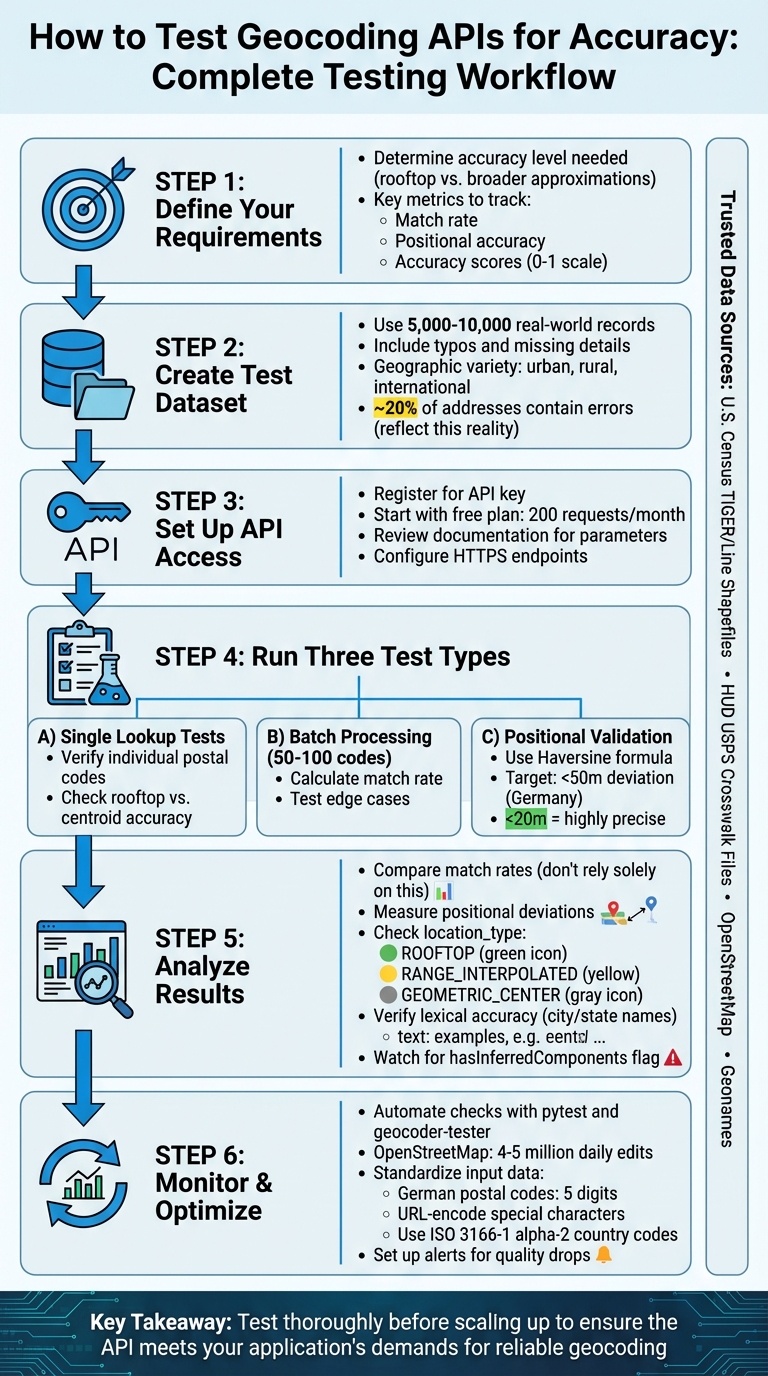
Complete Geocoding API Testing Workflow: 6 Steps from Setup to Monitoring
Fixing Invalid Latitude and Longitude Issues in Mapbox Geocoding for Android

Creating a Test Dataset
Building a reliable test dataset is a crucial step for any meaningful accuracy evaluation. Instead of relying solely on the "perfect" addresses often showcased in API documentation, use actual production data. Randomly select a mix of real-world locations to better reflect the challenges of typos, incomplete entries, and other common issues. This approach reveals how well the API handles messy, real-life data.
Geographic variety is another key factor. Some providers might excel in one region but struggle in others, producing noticeable inconsistencies. To address this, include locations from both dense urban areas and sparsely populated rural regions. Rural addresses are especially insightful since many geocoding services rely on interpolation to estimate positions along road segments. This method can falter in rural areas where house numbers are unevenly distributed. Testing irregular geographic boundaries can also highlight differences in accuracy.
For projects based in Germany, stick to local postal code formats and standards, but also consider testing international variations. For instance, the Netherlands uses alphanumeric postal codes like 4328 RR, while the UK employs formats such as PO33 3BT. Expanding your dataset to include countries like Brazil, Turkey, Norway, and France ensures you're accounting for varied address structures. When testing internationally, use API parameters like region biasing (e.g., ®ion=ca for Canada) to check whether the API prioritizes results correctly for specific areas.
Reliable sources such as the U.S. Census Bureau's TIGER/Line Shapefiles, HUD's USPS Crosswalk Files, OpenStreetMap, and Geonames can provide trusted reference data. For added accuracy, datasets of fixed locations like schools or fire stations offer verified records.
A practical technique is to use spatial joins to compare coordinates against geographic boundary files. This is particularly useful for verifying the accuracy of rural versus urban data points. Keep in mind that around 20% of addresses entered online contain errors, so your test dataset should reflect this reality. By carefully selecting and refining your data, you lay the groundwork for effective API accuracy testing.
Setting Up Zip2Geo API for Testing
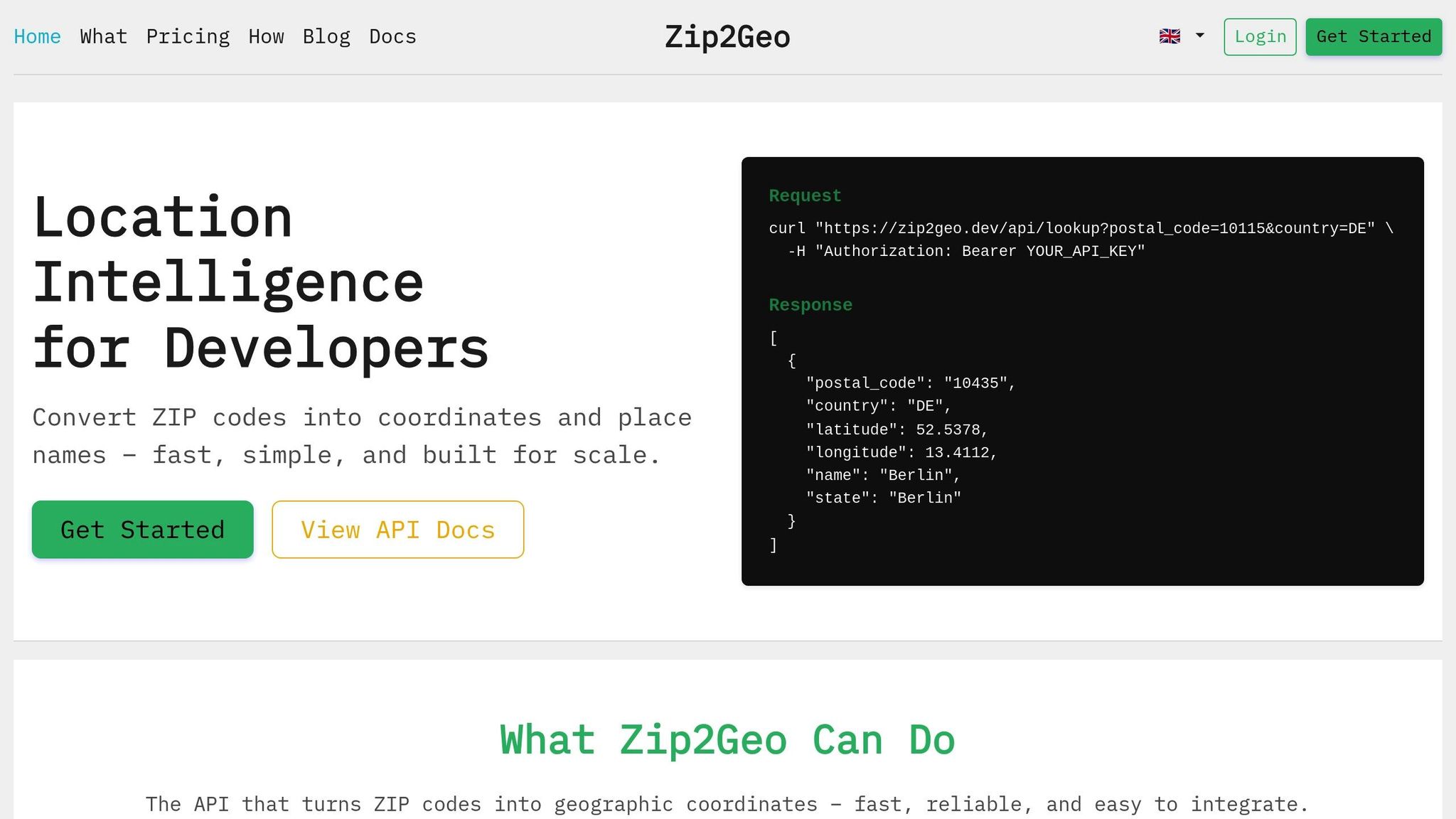
Once your test dataset is ready, the next step is to configure Zip2Geo for accuracy validation. Start by registering with Zip2Geo to get your API key. This key is required to access the API endpoints and should be included using the apikey parameter in your requests.
The main endpoint for accuracy testing is /api/v1/search, which translates postal codes into geographic coordinates. All requests must be made over HTTPS, and the API returns responses in JSON format. Make sure your validation scripts can effectively parse the nested JSON structure, which maps postal codes to detailed location data. With a 99.9% uptime guarantee, the API ensures reliability, and invalid requests won't impact your monthly usage quota.
Before diving into testing, it's important to review the API documentation for a smooth setup.
Reading the API Documentation
The API documentation is your go-to resource for understanding endpoint parameters, response formats, and filters like the country parameter for localized searches. For example, if you're testing postal codes in Germany, applying this filter ensures the API focuses on German results.
The JSON response is structured with a results object, where postal codes act as keys linked to arrays of location details. These details include latitude, longitude, city, state, and country_code. Unlike the flat arrays used by some other services, Zip2Geo's nested format requires tailored parsing logic. Additionally, batch processing is supported, allowing you to query multiple postal codes in one request by separating them with commas (e.g., codes=10115,80331). The documentation also specifies which fields are mandatory and which are optional, helping you build robust error handling into your scripts.
Using the Free Plan for Initial Tests
Zip2Geo offers a free plan that allows 200 requests per month, making it a great starting point for initial accuracy tests. There's no credit card required, so you can focus entirely on testing without any upfront commitment. This monthly quota is typically enough to test a representative sample of postal codes from different regions.
Begin with single postal code lookups to confirm the API's functionality and response structure. Once you're confident everything is working as expected, move on to batch requests for more extensive testing. The free plan gives you full access to all endpoints, allowing you to validate your dataset's accuracy before scaling up.
When you're ready for larger-scale testing, you can upgrade to the Starter plan for 5 €/month, which provides 2,000 requests. Higher-tier plans are also available to accommodate increased production needs. This phased approach ensures you can thoroughly test the API's accuracy and functionality before committing to higher volumes.
Testing Methods for Geocoding API Accuracy
To ensure Zip2Geo is functioning as expected, test its accuracy through three approaches: single lookup, batch processing, and positional validation. These methods evaluate match rate, positional accuracy, and overall reliability.
Single ZIP Code Lookup Tests
Begin by running individual queries to check if the API provides accurate coordinates for known locations. Use a GET request with one postal code and compare the returned latitude and longitude to a trusted reference.
For added clarity, map the coordinates to visually confirm their accuracy. The API response is structured in nested JSON, where postal codes correspond to location details. Make sure your validation script can parse key fields like latitude, longitude, city, and country_code. To double-check, manually review a sample from your dataset to ensure the results match the expected geographic areas.
Pay close attention to the precision of the coordinates. If the API provides rooftop-level accuracy, it pinpoints a specific building. On the other hand, centroid results represent the centre of a postal code area, which works well for broader regional analyses but may not suffice for tasks like delivery routing.
Once you're confident in the accuracy of single lookups, move on to batch testing to evaluate the match rate across larger datasets.
Batch Processing for Match Rate
After verifying individual lookups, test the API on a larger scale by processing 50–100 postal codes in a single batch. Zip2Geo supports this by allowing multiple codes in one API call, simplifying the handling of extensive datasets.
To calculate the match rate, divide the number of successful responses (those with a status of "OK") by the total number of submitted requests. Include a variety of regions and edge cases to better reflect real-world scenarios. Using operational data instead of idealized examples will highlight how well the API handles imperfect or messy inputs.
For easier tracking, include a unique identifier for each postal code in your test file. This makes it simple to trace API outputs back to the original input and identify codes that failed or returned incomplete matches.
Finally, test the spatial accuracy of the coordinates with positional validation.
Positional Accuracy Validation
The most thorough test involves checking how closely the API-generated coordinates match your baseline data. Use the Haversine formula to measure the distance (in metres) between the two sets of coordinates. Aim for deviations under 50 metres. Significant differences may suggest that the API is providing centroid coordinates rather than precise points. In Germany, where postal codes in rural areas can cover large regions, this distinction is especially important for applications that require precise location data.
Before running this test, ensure your input data is standardised and includes the ISO 3166-1 alpha-2 country code for consistent results.
sbb-itb-823d7e3
Analyzing Test Results
Building on earlier methods, this section dives into interpreting key performance metrics. Once you've collected data from single lookups, batch processing, and positional validation, the next step is to calculate the match rate. But here's the catch: a high match rate doesn't always guarantee reliable data. For example, an API might return coordinates for every postal code, yet some of these could be positioned at city centroids instead of precise locations, leading to false positives.
"If you are comparing a new solution to an existing one, it may be tempting to just compare the 'good address' match rates, and select the service that provides a higher match rate. This can be misleading because one service may be providing more false positives than the other." - Google Maps Platform
To avoid such pitfalls, examine positional deviations to identify centroid-based approximations. For instance, a 2025 benchmark of 1,000 addresses in Zurich showed Google and Bing achieving over 78% accuracy within a 20-metre deviation, while Mapcat failed to locate 42.5% of the addresses. In Germany, particularly for delivery routing, deviations under 20 metres are considered highly precise. On the other hand, deviations over 50 metres often indicate centroid approximations rather than rooftop-level accuracy. These metrics don't just highlight success rates - they also guide improvements in accuracy.
It's also important to analyze regional variations in accuracy. If certain postal codes consistently show lower accuracy scores or higher deviations, this could point to differences in data availability. For example, rural areas in Germany, where postal codes cover larger regions, tend to have more variation compared to urban centers. Use fields like location_type or validationGranularity to determine if results are labeled as ROOFTOP, RANGE_INTERPOLATED, or GEOMETRIC_CENTER. This can help identify whether the errors stem from the API's data source or the inherent nature of the postal code itself.
Beyond spatial accuracy, consider the consistency of textual location details. Lexical accuracy measures whether returned location names (such as city, state, or country) match reference records. Even when coordinates are correct, mismatched place names can create confusion in user-facing applications. Keep an eye on how often the API infers or substitutes components by checking the hasInferredComponents flag. If frequent inferences occur in specific regions, this could signal a pattern worth investigating further.
Creating Comparison Tables
Organizing your results into a table can help you identify trends and evaluate whether the API meets your accuracy needs. Here's an example of how to structure your findings:
| Metric | Single Lookup | Batch Processing | Positional Validation |
|---|---|---|---|
| Match Rate | 98% | 95% | 97% |
| Positional Deviation (m) | 12 m | 18 m | 15 m |
| Rooftop Accuracy | 85% | 78% | 82% |
| Lexical Similarity | 100% | 97% | 99% |
Use this data to refine automated checks in future tests. Set thresholds that align with your application's demands. For instance, you might only accept coordinates with a positional deviation below 20 metres and a granularity of ROOFTOP or PREMISE. If your application requires precise delivery addresses, consider excluding results where the API has inferred missing components, as these are often less reliable.
Monitoring and Optimization Practices
Keeping a close eye on your geocoding API's performance is critical. With the world in constant motion - OpenStreetMap alone sees 4–5 million edits daily - datasets are frequently updated, postal codes are revised, and address formats shift. These changes can impact how your API performs. To maintain reliable location data, continuous monitoring and consistent input standardization are key.
Automating Accuracy Checks
When you're processing large volumes of requests, manual validation isn't practical. Instead, use tools like pytest to automate regression tests. These tests compare your API's current responses with a saved baseline report, flagging any deviations. For example, tools like geocoder-tester allow you to define test cases in CSV or YAML format. If a postal code that previously returned coordinates within 15 metres suddenly shifts to 45 metres, the system will flag the discrepancy immediately.
Dive deeper into fields like validationGranularity, addressComplete, and inferred component flags to ensure results meet your quality benchmarks. Set up alerts for key metrics - such as when the percentage of ROOFTOP results drops below your baseline or when more responses include partial_match=true. Python libraries like geopandas can help calculate spatial deviations, while Levenshtein-based tools can assess the lexical similarity of returned place names against your reference data. Depending on your application's requirements, schedule these checks weekly or monthly.
Combining automated testing with robust input standardization ensures your API continues to deliver high-quality results.
Standardizing Input Data
One of the most common causes of geocoding errors is inconsistent input formatting. Start by cleaning up postal codes: remove spaces, convert them to uppercase, and ensure they adhere to local formats. For example, German postal codes must be exactly five digits long, including any leading zeros.
For address strings, standardize special characters by URL-encoding them and apply regional biasing using ISO 3166-1 alpha-2 codes (e.g., DE for Germany). If your application relies on user input, integrate a Place Autocomplete service to handle incomplete or misspelled addresses in real time. This method generates a Place ID, which geocodes more accurately than raw address strings.
Finally, keep an eye on response flags like partial_match or location_type=APPROXIMATE. These indicators signal that the geocoder couldn't find an exact match and that the result may need manual review. By identifying these patterns early, you can refine your input standardization logic and minimize the need for fallback requests, saving time and resources in the process.
Conclusion
Testing geocoding APIs is crucial to ensure they provide the exact data your application needs. Whether your focus is on pinpoint rooftop-level accuracy for delivery services or broader neighbourhood-level data for social platforms, thorough validation is key to defining what "accurate" means for your specific use case. As OpenCage aptly puts it, "The science behind geospatial technologies is complex, and is an entire field of study in itself."
The accuracy of geocoding results hinges on both the API's capabilities and the quality of the input data. Common errors often arise from issues like inconsistent formatting, typos, or missing fields. By taking steps such as cleaning and standardising your input data, keeping an eye on confidence scores, and automating regression testing, you can maintain dependable results - even as geographic data changes over time. To put this into perspective, OpenStreetMap alone sees 4–5 million edits every single day. This is where a dependable solution like Zip2Geo can make a real difference.
Zip2Geo builds on rigorous testing principles to deliver exceptional results. It offers production-level precision, global coverage spanning over 100 countries, lightning-fast response times measured in milliseconds, and structured JSON outputs that include latitude, longitude, city, state, and country information. Plus, its free plan allows for 200 monthly requests, making it easy to start testing accuracy without any upfront costs.
For applications where location data is critical, combining thorough testing with a reliable API ensures you have consistent and accurate data whenever you need it.
FAQs
How can I test my geocoding API to ensure accurate results across different regions?
To effectively test your geocoding API, start by building a regional test matrix. This should include a diverse selection of locations spanning continents, countries, and key sub-regions such as EU-West, EU-East, and APAC-Südost. Make sure to cover a variety of environments - urban centres, rural areas, border zones, and unique spots like mountain resorts or islands. For each location, record the complete address, expected latitude and longitude, and additional details like postal codes, cities, and states. Use this data to compare the API’s output with verified information, helping to pinpoint any discrepancies.
Integrate this matrix into an automated testing workflow to evaluate both forward geocoding (converting addresses into coordinates) and reverse geocoding (converting coordinates back into addresses). Focus on positional accuracy - ideally within 10 metres - and ensure the API meets locale-specific standards. For example, German address formatting, metric units, and the use of the € currency should be properly handled. To verify global coverage, tools like Zip2Geo can help confirm that all countries in your matrix are resolved accurately with reliable location data. Regular testing, such as scheduling checks on specific dates like 01.01.2026, is essential to catch any issues introduced by API updates or changes.
How can I create a reliable test dataset to evaluate geocoding API accuracy?
To create a dependable test dataset for evaluating geocoding API accuracy, start by gathering a varied collection of addresses. This should include everything from full street addresses and partial entries to PO boxes, rural locations, and international formats like German addresses (e.g., „Straße Hausnummer, PLZ Stadt“). Pair each address with its verified latitude and longitude from a trusted source to ensure accurate comparisons. Don’t forget to include challenging edge cases, such as special characters, diacritics, and less common address formats, while maintaining a balanced mix across different countries and languages.
It’s crucial to keep your data standardised and well-organised. Stick to consistent formats like CSV or JSON, using German conventions (e.g., commas for decimal points, dots for thousands) and ISO 8601 date formats (dd.MM.yyyy). When running tests, automate requests to the API while adhering to rate limits and managing errors efficiently. For reliable reference data, services like Zip2Geo can help validate or enrich your dataset with precise geographic coordinates and place names. By following these guidelines, you’ll build a dataset that offers valuable insights into the performance of geocoding APIs.
What does positional accuracy mean when evaluating a geocoding API?
Positional accuracy refers to how precisely a geocoding result matches its geographic location. This is usually represented by a confidence score, which typically ranges from 0 to 10. A lower score signals a smaller bounding box, indicating greater spatial precision, while a higher score suggests a larger area with reduced precision.
That said, positional accuracy measures precision but doesn’t guarantee the location is correct. To ensure reliable geocoding, it’s crucial to cross-check results against verified data or rely on trusted services that emphasize accurate and detailed geodata.