When working with location APIs, such as Zip2Geo, you’ll often deal with JSON responses containing geospatial data like coordinates, postal codes, and city names. Parsing this data can be tricky due to nested structures and varying formats between APIs. Here's a quick summary of what you need to know:
-
Key JSON Fields: APIs typically return latitude (
lat), longitude (lng), postal codes, and administrative details in nested objects likegeometryandaddress_components. - German-Specific Details: Postal codes (PLZ) always have 5 digits (e.g., "10117"), coordinates use the metric system, and addresses follow specific formatting (e.g., "Street Name 1, 10117 Berlin").
-
Programming Tips: Use safe methods to navigate JSON (e.g.,
.get()in Python), validate data (e.g., regex for postal codes), and handle errors gracefully (e.g., retry on transient API issues). - Localization: Ensure output aligns with German conventions, such as using commas for decimal separators (e.g., 52,5200) and displaying distances in kilometers.
The article provides examples for parsing JSON in JavaScript, Python, Java, and C#, helping you extract and format location data efficiently while addressing localization challenges for German contexts. Whether you're extracting coordinates for mapping or validating postal codes, these insights ensure accurate and context-appropriate results.
How To Parse JSON Response From A Weather API?
sbb-itb-823d7e3
Understanding JSON Responses from Location APIs
When working with location APIs, the data usually comes in the form of a JSON object packed with geospatial information. At the root level, you'll often find a status field (e.g., "status": "OK") and a results array containing one or more location matches. While field names can differ between providers, this structure makes it easier to switch between APIs.
Key data to extract typically includes coordinates (latitude and longitude in WGS84 format), postal codes (Postleitzahlen or PLZ in Germany), and administrative divisions such as cities and states. For example, a query for Berlin might return "lat": 52.5200065 and "lng": 13.404954 within a nested geometry.location object. Postal codes like "10117" could appear in an address_components array or directly in an address field, depending on the API.
Common Fields in Geolocation JSON Responses
The geometry object is where you'll find coordinate details. It typically includes:
-
location: Latitude and longitude as a pair. -
location_type: A precision indicator, such as "ROOFTOP" for highly accurate coordinates. -
viewport: Optional boundaries for map rendering.
Address information is often stored in an address_components array. Each element here represents a specific part of the location hierarchy, such as street_number, route (street name), locality (city), postal_code, or country.
Additionally, most APIs provide a formatted_address string, like "Unter den Linden 1, 10117 Berlin, Germany", for display purposes. However, it’s best to avoid parsing this string for data extraction. Instead, rely on the structured address_components array to pull specific details like postal codes or cities. This ensures consistency across regions.
Some APIs also include extra metadata, such as confidence scores (indicating the accuracy level, e.g., city-level or street-level) and timezone details. For German locations, the timezone is typically Europe/Berlin.
Here’s a quick table summarizing key JSON fields with examples specific to Germany:
| Field Name | Data Type | Description | Example (German Context) |
|---|---|---|---|
lat / latitude
|
Float | WGS84 Latitude coordinate | 52.5200065 |
lng / longitude
|
Float | WGS84 Longitude coordinate | 13.404954 |
postal_code |
String | Postal code (PLZ in Germany) | "10117" |
locality |
String | City or town | "Berlin" |
country |
String | Country | "Germany" (DE) |
location_type |
String | Precision level of coordinates | "ROOFTOP" |
Nested Objects and Arrays in JSON
Location hierarchies in JSON are often represented using nested structures. For example, to access the latitude of the first result, you might navigate to results[0].geometry.location.lat. These nested levels mimic the geographical hierarchy.
The address_components array can be tricky because its length and content vary by location. Instead of relying on a fixed index to find, say, the postal code, you’ll need to loop through the array and check the types field of each element to identify the correct component. Some APIs, like Nominatim, simplify this by placing the postal code directly in an address.postcode field when the addressdetails=1 parameter is included.
German-Specific Considerations
When working with German data, there are a few things to keep in mind:
- Postal Codes: German postal codes (Postleitzahlen) always consist of five digits. To preserve leading zeros (e.g., "01067" for Dresden), store them as strings instead of numbers.
-
Timezone: Locations in Germany use the
Europe/Berlintimezone, which follows Central European Time (CET) or Central European Summer Time (CEST). -
Administrative Divisions: The hierarchy of administrative divisions in Germany is specific. For example:
-
administrative_area_level_1corresponds to German states (Bundesländer) like "Bayern" or "Nordrhein-Westfalen." -
localityrefers to cities (Städte).
-
To ensure API responses are tailored to Germany, include filters like components=country:DE or set a region bias with region=de in your query parameters.
These details are crucial for effectively extracting and validating location data, setting the stage for the parsing techniques discussed in the next sections.
Parsing JSON in Popular Programming Languages
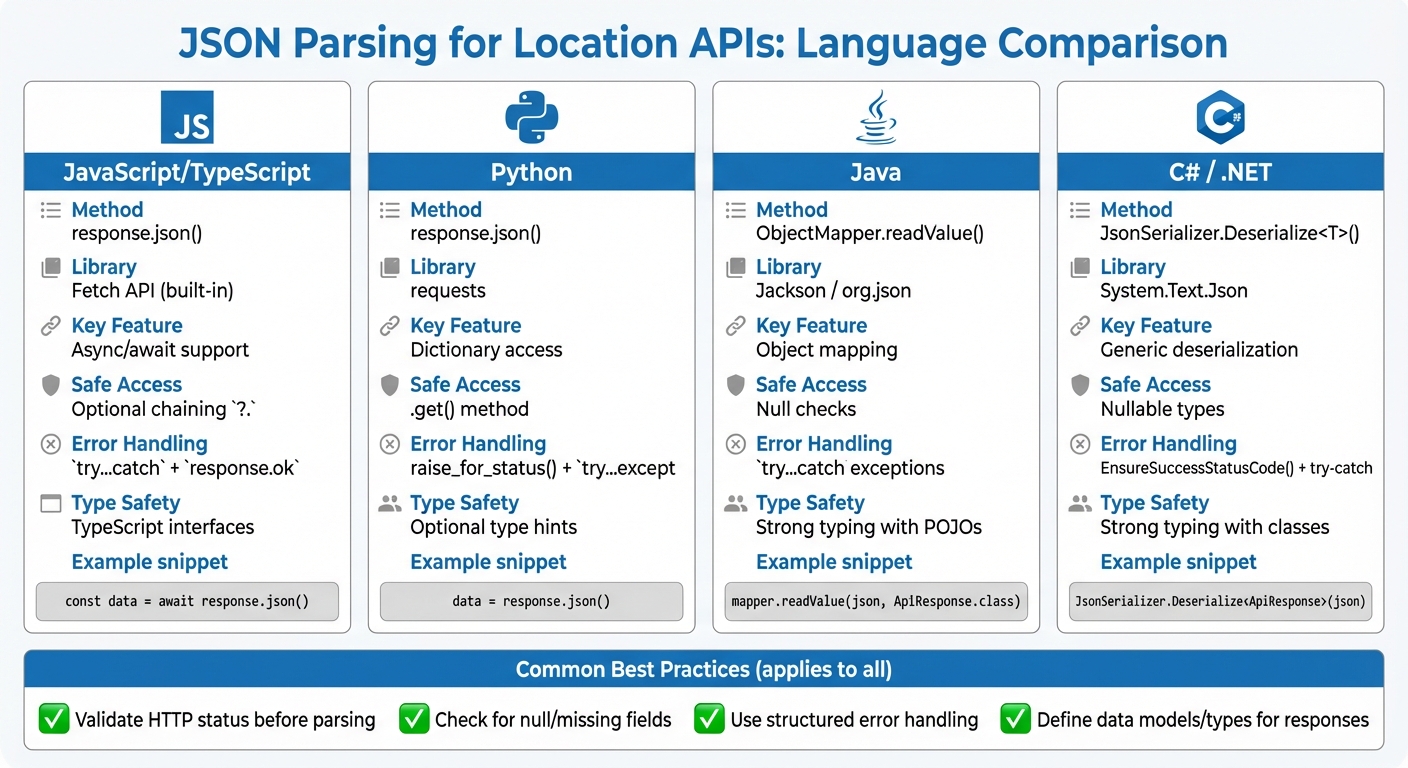
JSON Parsing Methods for Location APIs Across Programming Languages
Parsing JSON data is a common requirement when working with APIs, especially for extracting specific details like geospatial data or postal codes. Below are examples of how different programming languages handle JSON parsing while adhering to German formatting conventions.
JavaScript / TypeScript
JavaScript simplifies JSON parsing with the Fetch API and response.json() for asynchronous operations.
async function getLocationData(postalCode) {
  try {
    const response = await fetch(`https://api.zip2geo.dev/v1/lookup?postalCode=${postalCode}&country=DE`);

    if (!response.ok) {
      throw new Error(`HTTP error! Status: ${response.status}`);
    }

    const data = await response.json();

    if (data.status === 'OK' && data.results.length > 0) {
      const location = data.results[0].geometry.location;
      const lat = location.lat;
      const lng = location.lng;

      // Extract postal code
      const postalComponent = data.results[0].address_components.find(
        component => component.types.includes('postal_code')
      );

      console.log(`Coordinates: ${lat}, ${lng}`);
      console.log(`PLZ: ${postalComponent?.long_name}`);
    }
  } catch (error) {
    console.error('Parsing error:', error);
  }
}
Best Practices:
- Always check
response.okbefore accessing.json(). - Use
try...catchblocks to handle network errors and parsing issues. - Validate the presence of nested objects (e.g.,
results) before accessing their properties to avoid runtime errors.
For TypeScript, defining interfaces for API responses ensures type safety:
interface Location {
  lat: number;
  lng: number;
}

interface AddressComponent {
  long_name: string;
  short_name: string;
  types: string[];
}

interface GeocoderResult {
  formatted_address: string;
  geometry: {
    location: Location;
    location_type: string;
  };
  address_components: AddressComponent[];
}

interface ApiResponse {
  status: string;
  results: GeocoderResult[];
}
TypeScript's static typing adds an extra layer of reliability when working with structured JSON responses.
Python
Python’s requests library offers an easy-to-use .json() method for decoding API responses into dictionaries.
import requests

def get_location_data(postal_code):
    try:
        url = f"https://api.zip2geo.dev/v1/lookup?postalCode={postal_code}&country=DE"
        response = requests.get(url)

        # Raise HTTP errors
        response.raise_for_status()

        data = response.json()

        if data.get('status') == 'OK' and data.get('results'):
            result = data['results'][0]
            location = result['geometry']['location']

            lat = location['lat']
            lng = location['lng']

            # Extract postal code
            postal = next(
                (component['long_name'] for component in result.get('address_components', [])
                 if 'postal_code' in component.get('types', [])),
                None
            )

            print(f"Coordinates: {lat}, {lng}")
            print(f"PLZ: {postal}")
        else:
            print(f"No results found. Status: {data.get('status')}")
    except requests.exceptions.RequestException as e:
        print(f"Request error: {e}")
    except (KeyError, ValueError) as e:
        print(f"Parsing error: {e}")
Key Tips:
- Use
response.raise_for_status()to handle HTTP errors gracefully. - Use
.get()when accessing dictionary keys to avoidKeyError. - Validate the
statusfield and the presence of results before processing the data.
Java
Java offers robust libraries like Jackson and org.json for parsing JSON. Jackson is ideal for mapping JSON to Java objects, while org.json is better suited for lightweight tasks.
Using Jackson:
import com.fasterxml.jackson.databind.ObjectMapper;
import java.net.http.HttpClient;
import java.net.http.HttpRequest;
import java.net.http.HttpResponse;
import java.net.URI;

public class LocationParser {
    public static void main(String[] args) {
        try {
            String postalCode = "10117";
            String url = "https://api.zip2geo.dev/v1/lookup?postalCode=" + postalCode + "&country=DE";

            HttpClient client = HttpClient.newHttpClient();
            HttpRequest request = HttpRequest.newBuilder()
                .uri(URI.create(url))
                .build();

            HttpResponse<String> response = client.send(request, HttpResponse.BodyHandlers.ofString());

            ObjectMapper mapper = new ObjectMapper();
            ApiResponse apiResponse = mapper.readValue(response.body(), ApiResponse.class);

            if ("OK".equals(apiResponse.getStatus()) && !apiResponse.getResults().isEmpty()) {
                GeocoderResult result = apiResponse.getResults().get(0);
                Location location = result.getGeometry().getLocation();

                System.out.println("Coordinates: " + location.getLat() + ", " + location.getLng());

                // Extract postal code
                for (AddressComponent component : result.getAddressComponents()) {
                    if (component.getTypes().contains("postal_code")) {
                        System.out.println("PLZ: " + component.getLongName());
                        break;
                    }
                }
            }
        } catch (Exception e) {
            System.err.println("Error: " + e.getMessage());
        }
    }
}
Best Practices:
- Create classes (
ApiResponse,GeocoderResult,Location,AddressComponent) to map the JSON structure. - Use Jackson for seamless conversion from JSON to Java objects.
For simpler use cases, org.json can handle JSON directly:
import org.json.JSONObject;
import org.json.JSONArray;

JSONObject data = new JSONObject(responseBody);
if ("OK".equals(data.getString("status"))) {
    JSONArray results = data.getJSONArray("results");
    JSONObject firstResult = results.getJSONObject(0);
    JSONObject location = firstResult.getJSONObject("geometry")
                                     .getJSONObject("location");

    double lat = location.getDouble("lat");
    double lng = location.getDouble("lng");
}
C# / .NET
C# developers can use System.Text.Json (built-in) or Newtonsoft.Json for JSON parsing. Here's an example using System.Text.Json:
using System;
using System.Net.Http;
using System.Text.Json;
using System.Threading.Tasks;

namespace Zip2GeoExample
{
    public class Location
    {
        public double Lat { get; set; }
        public double Lng { get; set; }
    }

    public class Geometry
    {
        public Location Location { get; set; }
    }

    public class AddressComponent
    {
        public string LongName { get; set; }
        public string ShortName { get; set; }
        public string[] Types { get; set; }
    }

    public class GeocoderResult
    {
        public string FormattedAddress { get; set; }
        public Geometry Geometry { get; set; }
        public AddressComponent[] AddressComponents { get; set; }
    }

    public class ApiResponse
    {
        public string Status { get; set; }
        public GeocoderResult[] Results { get; set; }
    }

    class Program
    {
        static async Task Main(string[] args)
        {
            string url = "https://api.zip2geo.dev/v1/lookup?postalCode=10117&country=DE";
            using HttpClient client = new HttpClient();

            HttpResponseMessage response = await client.GetAsync(url);
            response.EnsureSuccessStatusCode();

            string responseBody = await response.Content.ReadAsStringAsync();
            var apiResponse = JsonSerializer.Deserialize<ApiResponse>(responseBody);

            if (apiResponse.Status == "OK" && apiResponse.Results.Length > 0)
            {
                var location = apiResponse.Results[0].Geometry.Location;
                Console.WriteLine($"Coordinates: {location.Lat}, {location.Lng}");
            }
        }
    }
}
C# provides powerful tools for parsing JSON into strongly typed objects, ensuring reliability and clarity in data handling.
These examples illustrate how to work with JSON across languages, focusing on error handling and structured parsing for geospatial data.
Extracting and Validating Geospatial Fields
When working with JSON data for geospatial purposes, especially in the context of German standards, it's crucial to extract relevant fields accurately and ensure the data aligns with local formatting and precision requirements. This process involves navigating JSON structures, validating the extracted data, and tailoring the output for German users.
Navigating Nested JSON Objects
Geospatial data in JSON responses is often organized in predictable patterns but requires careful handling to extract the necessary details. For instance, latitude and longitude coordinates are typically located at paths like results[0].geometry.location.lat and results[0].geometry.location.lng. However, extracting details like postal codes or city names can be more complex. These are usually found in the address_components array, where the order is not fixed.
To retrieve a German postal code (PLZ), filter the address_components array by checking the types field for the "postal_code" tag. Similarly, the "locality" tag can be used to identify city names, while "administrative_area_level_1" corresponds to federal states (Bundesländer). The Google Maps Platform documentation advises against programmatically parsing the formatted_address field, recommending the use of individual address components instead:
"Do not parse the formatted address programmatically. Instead you should use the individual address components, which the API response includes in addition to the formatted address field."
Additionally, the location_type field provides context about the precision of the data. For instance, "ROOFTOP" indicates street-level accuracy, while "APPROXIMATE" suggests a broader area. These distinctions are essential for ensuring that the extracted data meets the precision and formatting standards expected in Germany.
Validating and Normalizing Geospatial Data
To ensure accuracy, validate and normalize the extracted geospatial data. German postal codes, for example, consist of exactly five digits. They can be validated using a regular expression like ^\d{5}$, and the values should fall within the range of 01067 to 99998. The first digit of the postal code often indicates a broad geographic region - for example, codes starting with '1' cover areas like Berlin and North East Germany, while '8' includes Bavaria and Munich.
For latitude and longitude, high precision is key. Coordinates should be recorded to at least six decimal places for tasks like regulatory compliance or detailed mapping. This level of precision was highlighted in a study by Lukas Kriesch and Sebastian Losacker from Justus Liebig University Giessen, where they processed 50 million German news articles in July 2025. Using a custom Named Entity Recognition model based on Llama-3.1-8B, they successfully resolved location entities to geographic coordinates, mapping them to German NUTS-3 regions. Their research underscores the importance of precision in large-scale geospatial analysis.
Normalize all inputs to avoid errors. This includes converting text to lowercase, trimming whitespace, and encoding special characters (ä, ö, ü, ß) in UTF-8. Proper normalization reduces character corruption and improves geocoding accuracy.
Data Representation for German Contexts
When presenting geospatial data to German users, adhere to local formatting conventions. For instance, while APIs typically return coordinates as floats with periods (e.g., 52.5200), German users expect commas as decimal separators (e.g., 52,5200). Similarly, distances should be displayed in metric units like kilometres and metres, rather than miles and feet.
For localized results, configure API queries with parameters like language=de to receive place names and addresses in German. Pair this with region=de or components=country:DE to prioritize results within Germany. This ensures that ambiguous queries, such as "Frankfurt", are interpreted as Frankfurt am Main rather than Frankfurt (Oder).
To maintain consistency across systems, map cities to their corresponding NUTS-3 regions. This standardization simplifies data comparison and reporting, especially in larger datasets.
| Field Type | JSON Path | German Validation |
|---|---|---|
| Latitude | geometry.location.lat |
Must have at least 6 decimal places |
| Longitude | geometry.location.lng |
Must have at least 6 decimal places |
| Postal Code | address_components[i].long_name |
Filter by types: ["postal_code"]; validate as a 5-digit code |
| City | address_components[i].long_name |
Filter by types: ["locality"]
|
| Federal State | address_components[i].short_name |
Filter by types: ["administrative_area_level_1"]
|
Handling Errors, Edge Cases, and Localization Challenges
In this section, we’ll dive into the practicalities of managing errors, edge cases, and localization when working with German data, following up on our earlier discussion about parsing techniques.
Dealing with API Errors and Missing Fields
Start by checking the status field in the JSON response. Typical status codes include OK, ZERO_RESULTS, OVER_QUERY_LIMIT, REQUEST_DENIED, INVALID_REQUEST, and UNKNOWN_ERROR. Each of these requires a tailored approach:
- For transient issues like
UNKNOWN_ERRORor 5XX server errors, implement exponential backoff for retries, beginning with a 100 ms delay and doubling with each attempt. - For
INVALID_REQUESTerrors, don’t retry. Instead, inspect and correct the request structure before resubmitting.
When accessing nested JSON fields, use safe methods like Python’s .get(). Unlike direct bracket access, .get() prevents KeyError exceptions by returning None if a field is missing. To avoid surprises later, validate the JSON structure as early as possible.
Now, let’s look at geospatial data challenges specific to Germany.
Geospatial Edge Cases
German postal codes, or PLZ (Postleitzahlen), introduce some unique considerations. Since these codes can begin with a zero (e.g., 01067 for Dresden), always treat them as strings rather than integers. Valid PLZ codes range from 01067 to 99998, covering 8,170 unique entries across the country. The first digit of the code indicates a geographic region: for example, codes starting with '1' cover North East Germany (including Berlin), while '8' is for Bavaria and Munich. This can help validate whether a postal code aligns with the intended location.
For ambiguous addresses, use place autocomplete to refine results. When working with APIs, it’s better to send addresses as structured components - such as address.postalCode or address.locality - rather than as a single, unstructured string. This reduces ambiguity and improves accuracy. To ensure the API prioritizes German locations, include parameters like locationBias or regionCode set to de.
With geospatial issues addressed, let’s move on to localization specifics.
Avoiding Localization Pitfalls
Localization for German users involves more than just translating text. German translations tend to expand in length, which can break fixed-width user interfaces. Always design layouts with flexibility to accommodate this text expansion.
For numbers, keep in mind that German conventions use commas as decimal separators (e.g., 52,5200 instead of 52.5200). While APIs typically return coordinates with periods, ensure your output matches local expectations.
Special characters like ä, ö, ü, and ß must be encoded in UTF-8 to avoid corruption. For example, spaces should be encoded as %20 and # as %23 in API queries. Additionally, map raw API error messages into clear, user-friendly German messages. If a user encounters an error during a form submission - such as a failed location search - retain their original input so they can easily correct it without starting over.
When using location APIs, set the Accept-Language header to de to ensure German names and addresses are returned. However, note that some APIs provide exonyms (translated place names) by default. For example, "Munich" might be returned instead of "München", depending on the language settings. To maintain consistency, configure both language=de and region=de parameters to align results with German user expectations.
Conclusion
To work effectively with JSON data, especially when dealing with geolocation APIs like Zip2Geo, a clear and structured approach is key. This means understanding how to handle nested objects, validating the parsed results, and tailoring the output to match local formats.
For German users, localization is a critical step. When querying the API, include language=de and region=de to ensure German place names and address formats are returned. Pay special attention to German postal codes - treat them as strings to retain leading zeros - and format coordinates using commas as decimal separators (e.g., 52,5200) to align with local conventions.
Error handling also plays a crucial role in creating a reliable system. Use strategies like exponential backoff for temporary errors, .get() methods to safely access fields without triggering exceptions, and try-except blocks to manage malformed data gracefully. Additionally, adapting error handling to account for local nuances, such as correctly encoding URLs with umlauts, builds user trust. Always enforce HTTPS to ensure secure connections and protect data integrity.
FAQs
How can I reliably extract geospatial data from JSON responses provided by location APIs?
To accurately extract geospatial data like latitude, longitude, and postal codes from JSON responses, the process starts with validating the API response. Make sure the response indicates success and that the JSON structure is properly formatted. If the response contains an error, log the issue immediately and skip further processing.
Leverage a reliable JSON parser for your programming language to transform the response into an object you can easily work with. Access fields directly by their names (e.g., lat, lon, or zip) and navigate nested structures by following the hierarchy, avoiding inefficient string searches. Always double-check the extracted data: latitude should range between -90 and +90, and postal codes should align with the expected format, such as Germany's five-digit system.
Don’t forget to include error handling to deal with missing or malformed fields in a controlled way. Testing your extraction logic with real-world API responses, including edge cases, is essential for achieving consistent and reliable outcomes.
What are the best practices for managing errors when working with JSON responses from location APIs?
When working with JSON responses from location APIs, it's crucial to first check the HTTP status code (like 200 OK) and the specific status field provided by the API. If the status indicates an issue - such as OVER_QUERY_LIMIT or INVALID_REQUEST - log the error with all relevant details and halt further processing. This prevents crashes or the use of incomplete or incorrect data.
Always wrap your JSON parsing in a try-catch block (or its equivalent) to handle any malformed or unexpected data without breaking your application. Before using the data, ensure that essential fields, such as latitude, longitude, and postal code, are present and properly formatted.
For temporary issues like rate limits or network timeouts, implement a retry strategy with exponential backoff. For instance, wait 1 second, then 2 seconds, then 4 seconds, doubling each time up to a predefined maximum. Avoid flooding the API with repeated requests, and log errors with contextual details - such as timestamps and request information - to make debugging easier. If the API remains inaccessible, consider using cached data or displaying a clear, user-friendly message to maintain a seamless experience.
How can I adapt JSON data from location APIs for German users, including postal codes and coordinates?
To tailor JSON responses from location APIs for German users, consider these adjustments:
-
Set the language and region code: Add a field like
"language": "de-DE"to clearly specify that the data is localized for Germany. -
Format postal codes properly: German postal codes always consist of five digits (e.g.,
"postcode": "45131"). Store them as strings to preserve leading zeros. -
Localize coordinate formatting: JSON typically uses dots for decimals (e.g.,
"latitude": 51.430038), but for German users, display coordinates with commas instead (e.g.,51,430038° N, 6,998146° E).
By implementing these changes, you can make your JSON data more intuitive and accessible for a German audience.