When your API slows down, it can hurt user experience and business performance. Even a 100 ms delay can cut conversion rates by 7%, while improving speed by 0.1 seconds can boost retail conversions by 8.4%. For geocoding APIs, slowdowns often stem from network bottlenecks, overloaded servers, or inefficient queries.
To fix this, here are five practical solutions:
-
Request Delays and Rate Limiting: Stay within API limits and avoid errors like 429 by adding delays or using tools like
bottleneckto throttle requests. - Retry Logic with Exponential Backoff: Address temporary errors (e.g., 503) by retrying with increasing delays, while avoiding retry storms.
- Optimize Query Structure: Simplify inputs, remove unnecessary data, and use precise parameters like Place IDs to reduce processing time.
- Use Caching: Save repeated results locally or with tools like Redis to reduce API calls and speed up responses.
- Adjust Performance Settings: Allocate more CPU/memory, use batch processing for large datasets, and leverage multirole locators for efficiency.
Each solution targets specific bottlenecks to improve speed and reliability. Start by monitoring metrics like latency and error rates, then apply these fixes to ensure your API meets user expectations.
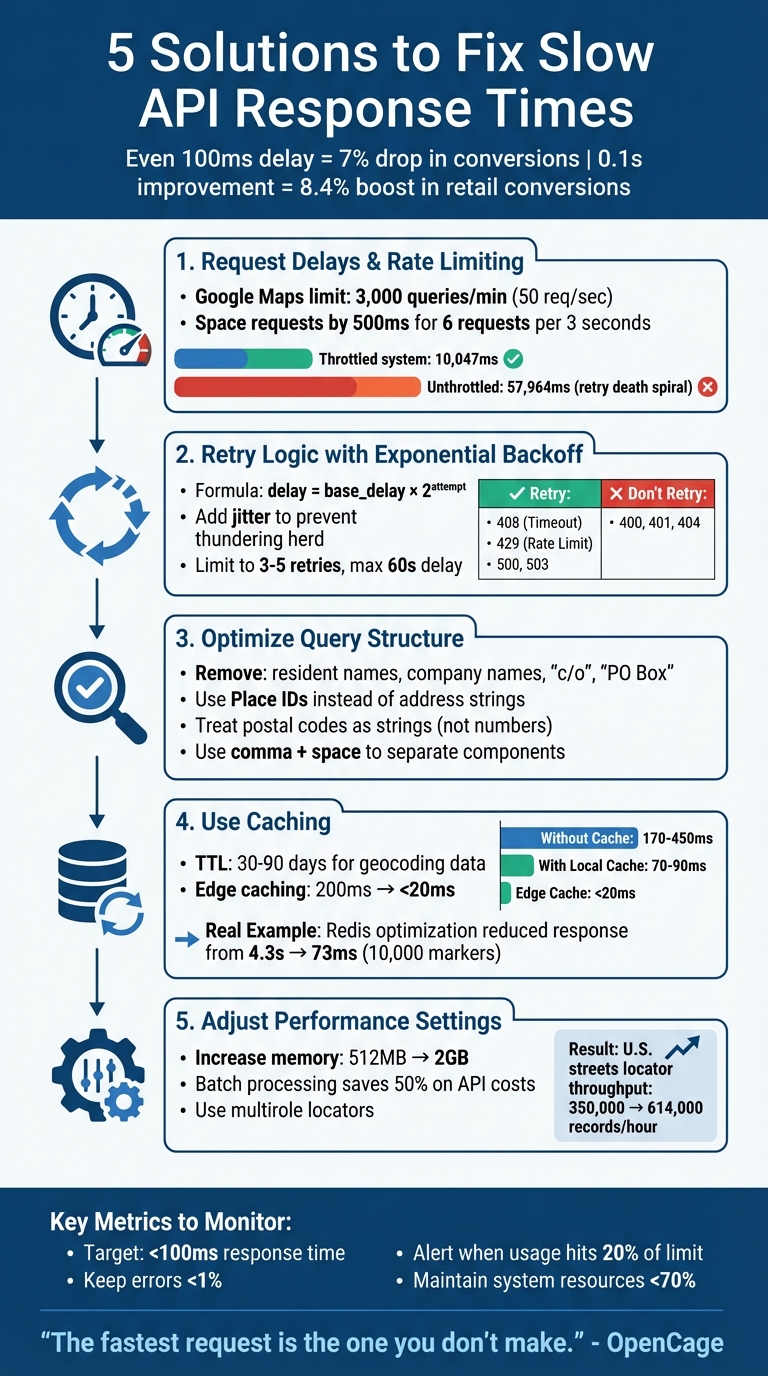
5 Solutions to Fix Slow API Response Times
Solution 1: Use Request Delays and Rate Limiting
How Rate Limits Affect API Performance
Geocoding APIs enforce rate limits, and exceeding them can lead to a 429 error or specific codes like OVER_QUERY_LIMIT. This isn't just a minor inconvenience - it can completely block your application until the limit resets. For example, the Google Maps Geocoding API allows up to 3,000 queries per minute, which breaks down to about 50 requests per second. Going over this limit can grind your data processing to a halt.
Repeated violations of rate limits may even result in temporary or permanent suspension of your API access. Worse, poorly managed retries can trigger "retry storms", where attempts to recover from errors flood the API with additional traffic, destabilizing the service.
"If you submit millions of similar requests during an ETL job, you will find rate limits and long tail latencies you never saw during development" - Radar Team
To avoid these issues, it's essential to introduce delays between your requests.
Adding Delays Between Requests
Understanding the impact of rate limits is the first step. The next is proactively managing your request intervals. Instead of waiting for a 429 error to force you to slow down, you can throttle your requests to stay well within the limits. For instance, if the API allows six requests every three seconds, you can space out your calls by 500 milliseconds. This approach can help maintain the stability of your location-based services.
In production environments, tools like bottleneck, p-limit, or @geoapify/request-rate-limiter are invaluable for managing request queues. These libraries often use the token bucket algorithm, a proven method for rate limiting. In one test, a token bucket implementation completed 20 parallel requests in 10,047 milliseconds without retries, while an unthrottled system took 57,964 milliseconds due to a "retry death spiral".
How to Configure Delay Intervals
Configuring the right delay intervals is key to smooth API operations, especially for tasks like geocoding large datasets. Start by checking your API provider's documentation for specific limits. Then, set your client-side threshold slightly below the maximum - about 90% of the allowed quota is a good rule of thumb. For high-volume tasks, break your data into manageable chunks (e.g., 1,000 addresses) and add fixed delays between processing each batch.
Avoid synchronizing requests at fixed intervals (e.g., every minute), as this can create patterns resembling DDoS attacks. Instead, introduce jitter - small, random variations in delay times - to prevent multiple clients from overwhelming the server simultaneously. Additionally, always respect the Retry-After header value when encountering a 429 error. This ensures your application remains compliant and avoids unnecessary disruptions.
sbb-itb-823d7e3
Solution 2: Use Retry Logic with Exponential Backoff
What Are Transient Errors
APIs don’t always fail permanently. Transient errors are temporary issues, like network interruptions, server overloads (HTTP 5xx), request timeouts (HTTP 408), or rate limit errors (HTTP 429). These often resolve themselves within seconds or minutes. Unlike permanent client-side errors like 400 Bad Request or 404 Not Found, transient errors simply mean the service needs a bit of time to recover.
The key is knowing which errors to retry. For example, retrying a 401 Unauthorised error won’t fix incorrect credentials. However, waiting a few seconds after a 503 Service Unavailable error often works. By understanding this, you can avoid wasting resources and ensure your geocoding app stays functional, even during heavy traffic.
How to Implement Exponential Backoff
Exponential backoff is a retry strategy where the wait time between retries increases exponentially - doubling with each attempt. For instance, the delays might go from 1 second to 2 seconds, then 4 seconds, and so on. This approach reduces the load on the API, giving it time to recover. The formula is simple: delay = base_delay * 2^attempt, where the base delay is often 1 second, and the attempt number increments with each retry.
However, if multiple clients retry at the same time, it can cause a "thundering herd" effect, overwhelming the server even more. To avoid this, add jitter: a randomised delay like actualDelay = random(0, exponentialDelay). This spreads out retry attempts and prevents synchronized spikes that could resemble a DDoS attack.
"A well-implemented retry strategy is the difference between an application that degrades gracefully under load and one that falls over." - Nawaz Dhandala, OneUptime
When handling 429 Too Many Requests errors, always respect the Retry-After header. This header specifies how long to wait before retrying and should override your calculated backoff time. Many production-ready libraries, like Google Cloud's SDKs, already include exponential backoff, saving you from coding it yourself.
While retrying is crucial, it’s equally important to limit the number of retries to conserve resources.
Setting Maximum Retry Limits
Retrying indefinitely can drain resources, exhaust API quotas, and even cause cascading failures across your system. To avoid this, limit retries to 3–5 attempts and cap the delay at 60 seconds. This prevents excessive wait times and wasted resources. Once the retry limit is reached, log the error and move the task to a dead-letter queue for further investigation.
For critical systems, consider using circuit breakers alongside retry logic. A circuit breaker temporarily halts requests (e.g., for 60 seconds) if an API keeps failing, giving the service time to recover.
| HTTP Code | Status | Action |
|---|---|---|
| 408 | Request Timeout | Retry |
| 429 | Too Many Requests | Retry (respect Retry-After) |
| 500 | Internal Server Error | Retry |
| 503 | Service Unavailable | Retry |
| 400 | Bad Request | Do Not Retry |
| 401 | Unauthorised | Do Not Retry |
| 404 | Not Found | Do Not Retry |
In production, if 429 errors exceed 1% of total requests, it’s a sign to rethink your architecture or upgrade to a higher API tier. To stay ahead of issues, set alerts when your API usage nears 20% of its limit. This proactive approach can help prevent disruptions before they escalate.
How to Optimize API Performance for High-Traffic Applications | Keyhole Software

Solution 3: Improve Query Structure and Input Validation
Building on earlier solutions that tackle request flow and retry logic, refining your query structure and validating inputs can directly cut down processing delays.
How Poor Query Structure Slows Performance
The way you format geocoding queries can significantly affect how quickly APIs respond. For example, when you send an address string to secondary APIs like Directions or Distance Matrix, an internal geocoding step is often triggered. This extra step adds latency, which could be avoided by using Place IDs instead of raw address strings.
Poorly formatted or ambiguous queries can lead to errors like ZERO_RESULTS or a partial_match flag, both of which indicate that the geocoder struggled to find an exact match. Common mistakes include adding irrelevant details like resident names, company names, "c/o", or "PO Box", which can confuse the geocoding engine. Similarly, using undefined values (e.g., NaN, NULL) or placeholders like "XXXX" for postal codes results in wasted API calls that produce no useful results. By simplifying and structuring your queries properly, you can avoid these pitfalls and get faster, more accurate responses.
How to Structure Queries for Better Performance
Streamlining the structure of your queries not only improves response time but also boosts geocoding accuracy. Remove non-geographic details like floor numbers, suite identifiers, or "care of" instructions, and use dedicated parameters such as country or postal_code for better precision.
"The more you can do to simplify, clean, and correct your queries, the better a chance we have to geocode quickly and correctly." - OpenCage
Pay special attention to postal codes. Always treat them as strings, not numbers, to prevent leading zeros from being dropped. For example, the postal code "02142" could mistakenly become "2142" if treated as a number, leading to incorrect results. Also, use a comma followed by a space to separate address components (e.g., "Hauptstraße 123, 10115, Deutschland") to help the API parse the location accurately. For applications where speed is critical, consider using Place Autocomplete to get a Place ID. Passing a Place ID to other APIs is generally faster and more reliable than using a raw address string.
| Query Issue | Impact | Recommended Fix |
|---|---|---|
| Including resident/company names | Confuses the API and reduces accuracy | Send only physical address components |
| Using address ranges (e.g., 123-127 Main St) | May cause parsing errors | Use a single building number (e.g., 123 Main St) |
| Missing country information | Leads to ambiguous results | Specify the country using a dedicated parameter |
| Including "PO Box" or "c/o" | Often not mapped; may trigger ZERO_RESULTS | Remove non-geospatial elements from the query |
Once your queries are optimized, validating input data ensures even greater performance gains.
Validate Input Data to Prevent Errors
Validating input data is crucial for avoiding unnecessary API calls and errors. For example, always specify a region (e.g., region=de for Germany) to narrow the search area and improve both speed and accuracy. Additionally, use percent-encoding for special characters - like converting spaces to %20 or # to %23 - to ensure the query is interpreted correctly by the web service.
For real-time user input, Place Autocomplete can help manage incomplete or misspelled entries while minimizing latency. If your application only requires basic coordinates, include parameters like no_annotations=1 to skip extra processing, which reduces both response size and time. Lastly, if the API returns a partial_match flag, prompt users to verify that all critical address components - such as street numbers - are included for better results.
Solution 4: Use Caching for Repeated API Calls
Caching responses can turn slow external API requests into quick local lookups, which is especially useful if your application frequently processes the same addresses or postal codes. By combining caching with optimized queries, you can significantly improve response times for repeated calls. This not only reduces costs but also ensures faster geocoding API performance.
Why Caching Speeds Up Geocoding APIs
When you send a geocoding request to an external API, the time taken includes network delays, server processing, and the response journey. The difference between an external API call and a cached lookup is striking - edge caching, for instance, can reduce global API latency from 200 ms to under 20 ms.
"The fastest request is the one you don't make." – OpenCage
Caching also helps cut costs by avoiding redundant API calls. For example, if your application processes the same postal code 100 times in a day, without caching, you’re paying for 100 API requests. With caching, you only pay for one. Services like Zip2Geo, which often handle common German postal codes like "10115" or "80331", can retrieve cached results instantly, saving both time and API quota.
How to Implement Caching
The cache-aside pattern is a practical approach. Before querying the API, your application checks the cache. If the data isn’t found (a cache miss), the API is queried, and the response is stored in the cache with a time-to-live (TTL) value. For geocoding data, a TTL between 30–90 days strikes a balance between speed and data accuracy.
-
Single-server environments: Use in-memory caching libraries like
node-cachefor near-instant lookups. -
Multi-server setups: Redis is a popular choice. It not only shares cached data across servers but also supports geospatial indexing (e.g.,
GEOADD,GEORADIUS).
For example, developer Florian Pfisterer optimized a mobile app’s map endpoint for 10,000 markers in Germany by using Redis with geospatial indexing. He created 17 separate caches for different Google Maps zoom levels (4–20), reducing API response time for a large bounding box from 4.3 seconds to just 73 ms on a 1 GB Redis instance.
To ensure accurate lookups, cache results using a unique hash of the normalized address. Since postal codes are only unique within their respective countries, include a country filter (e.g., postcode=10115&country=DE) in your cache key to avoid mismatches for identical postal codes in different countries.
Reduce Response Data for Faster Queries
Another way to improve performance is by limiting the data you request. For instance, use parameters like no_annotations=1 to skip additional metadata, reducing both response size and processing time. If you only need latitude and longitude, exclude extra details like timezone or administrative boundaries.
Smaller payloads not only speed up API responses but also make caching more efficient. This is particularly important when storing large datasets like thousands of postal codes. Every kilobyte saved reduces storage requirements and improves retrieval times.
| Request Type | Latency | Process Involved |
|---|---|---|
| Without Cache | 170–450 ms | External API call, network transit, and processing |
| With Local Cache | 70–90 ms | Local database lookup (~10 ms) and application logic |
| Edge Cache | < 20 ms | Retrieval from the nearest CDN data centre |
Solution 5: Adjust Performance Parameters
Fine-tuning hardware and configuration settings can significantly speed up API performance, especially when paired with software improvements. The way your geocoding infrastructure is configured - whether through resource allocation, batch processing, or locator architecture - has a direct impact on handling large volumes of postal codes and complex geospatial queries.
Ensure Sufficient CPU and Memory Resources
Geocoding engines are designed to utilize all available CPU cores. By setting threads to "Auto", the system can optimize usage automatically. In some enterprise setups, you might find it helpful to manually set the thread count (e.g., to 4) to align with system constraints.
"Using system memory (RAM) to work with locators is much faster than reading a locator from disk." – Jeff Rogers, Product Development Director for Geocoding, Esri
Memory allocation is another key factor. Increasing settings like "Data cache size" or "Runtime Memory Limit" ensures that reference data is stored in RAM, cutting down on slower disk reads. While locators often default to 512 MB of memory, raising the limit to 2 GB or more on 64-bit systems can yield better results.
For instance, Jeff Rogers demonstrated that increasing the RuntimeMemoryLimit to 2 GB and setting BatchPresortCacheSize to 100,000 records increased a U.S. streets locator's throughput from 350,000 to 614,000 records per hour. Organizing input addresses by geography - such as by state, city, and postal code - can also reduce memory reallocations and disk activity, making cached data usage more efficient.
To further optimize geocoding services, set the minimum and maximum number of service instances to the same value. This ensures consistent computational resources are available for processing. Additionally, storing locators and input tables on SSDs or other fast storage devices can help eliminate I/O bottlenecks.
Use Batch Processing for Large Volumes
Once resources are optimized, handling large datasets efficiently becomes the next focus. Batch geocoding allows you to process thousands - or even millions - of addresses in a single job, saving both time and manual effort. Instead of making individual requests, you can submit jobs via POST requests and retrieve results later through asynchronous processing.
This method can cut API call costs by as much as 50% compared to processing addresses one by one. To improve match rates, organize your address data into structured columns (e.g., street, city, state, postal code) and normalize addresses before submission. Aligning the number of batch processing threads with the available server instances - such as using eight threads for eight instances - ensures efficient resource usage.
When implementing a polling loop to check job statuses, use status codes like 202 for pending and 200 for completed. Set a polling interval of at least 60,000 ms (1 minute) and include a maximum number of attempts to avoid endless loops.
Use Multirole Locators
For even better efficiency, consider using multirole locators. These combine multiple data layers into a single locator file, simplifying the process compared to composite locators, which rely on multiple linked files. Multirole locators use an "order by role and score" logic, prioritizing results from the most precise roles (e.g., point addresses) to the least precise (e.g., postal codes).
Unlike composite locators - which can slow down performance if too many participating locators are involved - multirole locators streamline the fallback process. They are particularly useful for batch geocoding tasks. If composite locators are necessary, limit the number of participating locators to 10 or fewer to avoid performance issues. When using multirole locators, configure the system to prioritize results by role and score to ensure the most accurate matches are returned.
Conclusion
Slow API responses don’t have to be a permanent issue. The five approaches discussed - rate limiting, retry logic, query optimization, caching, and performance tuning - each target specific bottlenecks that can arise in your geocoding workflow. Whether it’s handling repeated postal codes like "10115" in Germany or processing millions of address records, there’s a solution for every scenario. For instance, if your application frequently geocodes the same delivery addresses, caching should be your top priority. On the other hand, for bulk jobs involving millions of records, batch processing and asynchronous queues are essential to stay within limits like the 3,000 queries per minute cap.
"Speed isn't just a nice bonus - it's the heartbeat of great user experience that drives real business results." – Zuplo
Before making changes, establish a performance baseline using monitoring tools. Focus on latency percentiles like p95 or p99, which give a clearer picture of how the slowest requests impact users compared to averages. Aim for response times under 100 ms and keep error rates below 1%. Netflix’s example highlights the power of optimization: by implementing EVCache, a distributed caching system, they increased their API success rates by up to 50%. This demonstrates how strategic improvements can significantly enhance performance.
Optimization isn’t a one-and-done task - it’s an ongoing process. As your application grows and user behavior shifts, new challenges will surface. Use automated alerts to flag performance dips and correlate traffic spikes with latency issues to pinpoint the causes. Keeping system resource usage below 70% is another important step to avoid overloading.
"Optimizing an API is a continuous process, crucial for handling the demands of modern applications." – Zuplo
Ultimately, choose your optimization strategies based on traffic patterns, geographic distribution, and error trends. Roll out changes gradually, track their impact, and adjust your approach as new data uncovers further opportunities for improvement. By staying proactive, you can ensure your API delivers both speed and reliability.
FAQs
How do I find out what’s actually causing my API latency?
To tackle API performance issues, begin by measuring response times for each endpoint. This will help you identify where delays occur. Use diagnostic tools to uncover bottlenecks, which might stem from factors like network congestion, high server load, or inefficient database queries.
Dive deeper by analyzing traffic patterns to separate network latency from server processing time. This distinction is key to pinpointing whether the problem lies with the network or the server-side processes.
When should I use caching vs retries vs rate limiting?
Caching is a smart way to store data that’s requested often, cutting down on repetitive API calls and speeding up response times. It works best for data that remains stable over time. When dealing with temporary hiccups, like network glitches, retries come in handy. Using exponential backoff prevents overwhelming servers by spacing out retry attempts. Rate limiting, on the other hand, helps manage API quotas by controlling the flow of requests. This is especially useful during tasks with heavy traffic, as it avoids throttling or blocked requests. Each of these strategies has its own purpose, so choose the one that fits your situation best.
How can I speed up geocoding without losing accuracy?
To make geocoding faster without sacrificing precision, start by standardising and cleaning your input data. This reduces the chances of errors and the need for retries. Use techniques like parallel requests and batch processing to handle more data efficiently. However, avoid grouping multiple locations into a single request, as this can lead to inaccuracies.
Another key step is to implement caching for queries that are repeated often. This not only reduces latency but also speeds up the overall process. Lastly, ensure your address data is well-formatted - this simple step can significantly improve both speed and accuracy.