Every geocoding API call costs money, and for high-traffic applications, these costs can quickly add up. For example, services like Google Maps charge approximately €4.75 per 1,000 requests after exceeding free credits. If your app handles 10,000 daily lookups, you could face monthly bills exceeding €1,000. The good news? Caching can reduce these costs by up to 90% while improving response times.
Key Insights:
- The Problem: High costs due to redundant API calls, especially for repeated queries like page refreshes or unchanged ZIP codes.
- The Solution: Implement caching to store results locally, avoiding repeated API calls for the same data.
-
Benefits:
- Cost Savings: Cut API expenses by up to 90%.
- Faster Responses: Cached data is retrieved in 70–90 ms, compared to 170–450 ms for API calls.
- Reliability: Cached data ensures uninterrupted service during API outages.
How It Works:
- Caching Basics: Store frequently requested geocoding results locally (e.g., in Redis or a database).
- TTL Policies: Use Time-To-Live (TTL) settings (e.g., 30–90 days) to balance data freshness and cost efficiency.
- Real-World Impact: A team reduced a €11,400 monthly geocoding bill to "pennies" by combining caching with batch processing.
Whether you choose in-memory caching (Redis) for speed or database caching for long-term storage, this strategy ensures both cost efficiency and improved user experience.
How Caching Works for Geocoding APIs
What Is Caching?
Caching is like a shortcut for data retrieval. Instead of repeatedly querying an external geocoding API for something like the coordinates of "10115 Berlin", the system checks a temporary storage area - its cache - first. If the data is already stored, it’s delivered almost instantly without needing to contact the API. This not only saves time but also avoids unnecessary API costs.
Here’s how it works: when a client makes a request, the system creates a unique identifier (a cache key) based on the URL and parameters. It then searches for this key in a storage system like Redis or a database. If the key exists, the cached data is returned in as little as 10–20 milliseconds. If the data isn’t there, the system queries the external API, saves the result in the cache, and then sends it to the user.
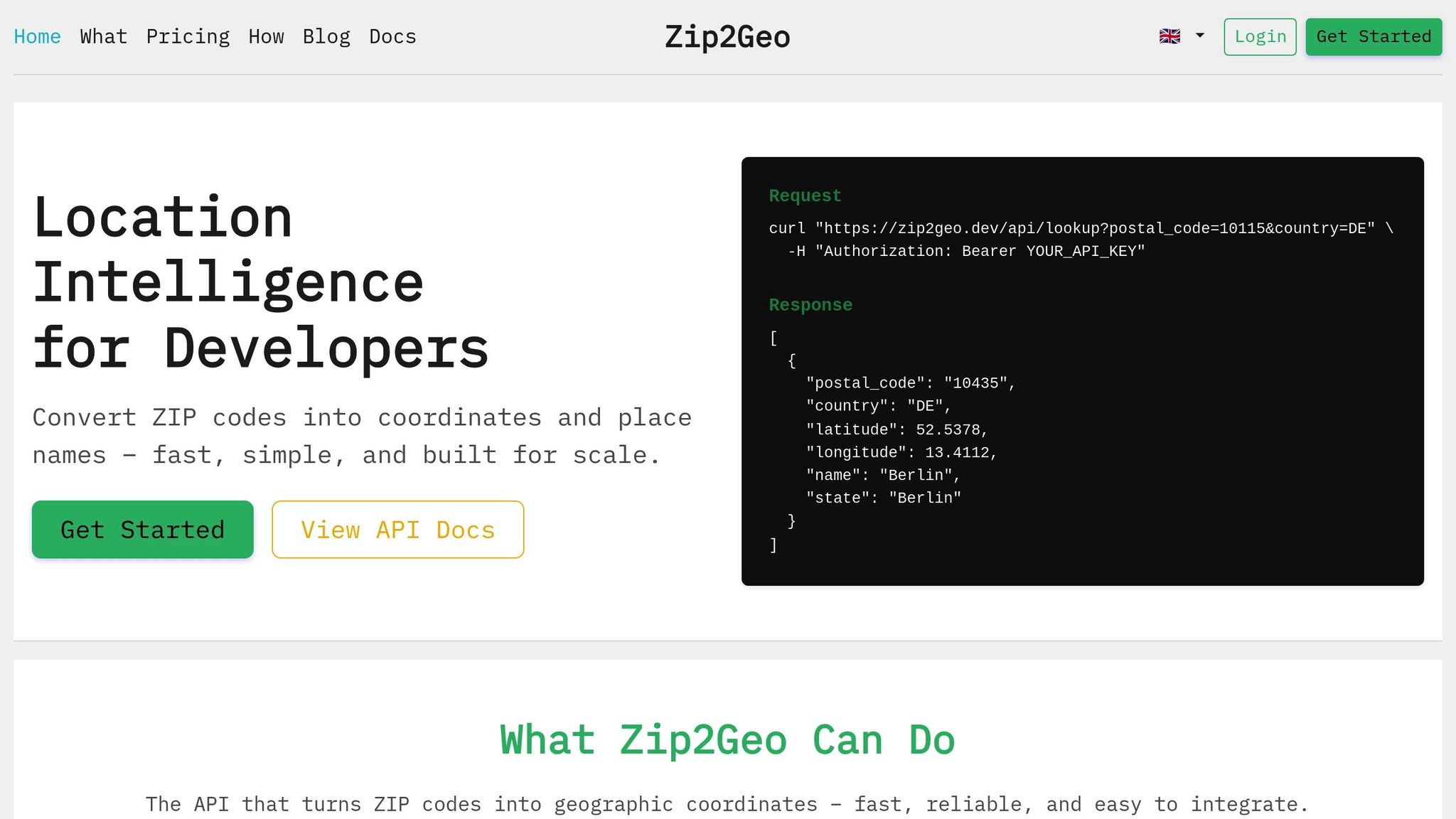
For services like Zip2Geo (https://zip2geo.dev), which focus on converting postal codes into geographic coordinates, caching is especially efficient. Postal codes rarely change, making them perfect for long-term storage. Advanced systems use Time-To-Live (TTL) policies - often set to 30 days for coordinate data - to strike a balance between keeping data fresh and controlling costs. This streamlined approach not only saves bandwidth but also boosts efficiency, cutting costs and speeding up response times.
Cost Savings and Faster Response Times
Caching doesn’t just make data retrieval quicker - it also slashes costs and improves performance. Let’s break it down: imagine handling 10,000 daily geocoding requests at €4.75 per 1,000 lookups. That adds up to about €1,425 per month. With caching, costs can drop by as much as 90%, delivering massive savings.
The performance improvement is just as striking. While external API calls typically take 170–450 milliseconds, cached responses are returned in just 70–90 milliseconds - a 10× speed boost. This means faster-loading pages, instant form responses, and a better overall user experience.
"Address caching transforms slow external API calls into lightning-fast database lookups, delivering significantly faster performance while reducing costs by up to 90%."
- Address-Hub
A real-world example? In September 2025, Rami Yakoub’s team at Ergeon tackled a hefty €11,400 monthly geocoding bill. By implementing a grid-based caching system using 50×50 metre cells stored in DynamoDB, they batched 100 elevation points per request and used bilinear interpolation to estimate coordinates between cached points. This approach brought costs down to "pennies" and dramatically improved the responsiveness of their CAD tool. Over 2.5 years, they cached data for a massive 9,735 km² area.
Caching also acts as a safety net. If your primary geocoding provider goes offline, cached data ensures your application keeps running smoothly. For mission-critical systems, this reliability is a game-changer, ensuring location data is always accessible when it’s needed most.
sbb-itb-823d7e3
Caching Strategies for Zip2Geo API
In-Memory Caching with Redis

Redis offers a fast in-memory caching solution, making it a great fit for handling Zip2Geo API responses. By using a Cache-Aside pattern, your application checks Redis first for a ZIP code's coordinates. If Redis doesn’t have the data (a "cache miss"), the API is queried, the result is stored in Redis, and then returned to the user. Once cached, subsequent requests for the same ZIP code are lightning-fast, typically taking just 70–90 milliseconds to respond.
To make caching more effective, it's important to standardise ZIP code formats before querying Redis. For example, trim any extra spaces and ensure German postal codes follow the 5-digit format. This avoids unnecessary API calls for variations like "10115", " 10115 ", or "10115 Berlin". Use a consistent key structure such as zip2geo:DE:10115 for storing results, which simplifies lookups.
Set a Time-To-Live (TTL) of 30 to 90 days to balance the freshness of your data with cost efficiency. To manage memory effectively, configure Redis with a maxmemory policy like allkeys-lru, which automatically removes the least recently used keys when memory is full. For high-traffic scenarios, add a locking mechanism to prevent "cache stampedes", where multiple requests for the same key cause redundant API calls when the cache expires.
Database Caching for Long-Term Storage
For persistent caching that survives server restarts, databases like PostgreSQL or MySQL are reliable options. Create a cache table with fields for ZIP code (as the search key), latitude, longitude, city, state, country, and a timestamp to track freshness. If you’re storing more detailed API responses, PostgreSQL’s JSONB format is a flexible choice, while MySQL’s BLOB fields can handle serialised data.
When a ZIP code is requested, check the database first. If the data exists, return it; otherwise, query the Zip2Geo API, save the result, and then return it. This approach ensures efficient reuse of data, reducing unnecessary API calls. For large-scale use cases involving millions of lookups, consider leveraging PostGIS spatial indexing. This allows for advanced queries like finding all cached ZIP codes within 50 kilometres of Berlin - without having to call the API.
To keep the data accurate, use PostgreSQL's pg_cron extension to automatically remove rows older than 90 days. If your application has heavy write operations, UNLOGGED tables can improve performance by skipping the Write-Ahead Log. However, this does come at the expense of crash recovery.
Batch Processing and Cache Expiration
Managing your cache effectively also involves smart expiration and updating strategies. A "Stale-While-Revalidate" approach can be helpful: serve cached data immediately, while a background process fetches updated coordinates. This ensures users experience zero delays, even as the data stays fresh.
For applications dealing with large datasets, batch processing is key. Use asynchronous worker queues to stay within API rate limits and add random delays (jitter) to refresh tasks. This prevents thousands of simultaneous requests from overloading the Zip2Geo API. Keep an eye on your cache hit ratio - if it drops below 90%, it could signal that your TTLs are too short or your cache keys are overly specific. Regularly tracking these metrics can help fine-tune your caching strategy for better performance and cost savings. These techniques lay the groundwork for precise performance monitoring and ROI analysis, which will be discussed in the next section.
Google Maps API with Laravel

Measuring Cache Performance and Cost Savings
Geocoding API Caching Methods Comparison: Cost Savings and Performance
Tracking Cache Hit Rates
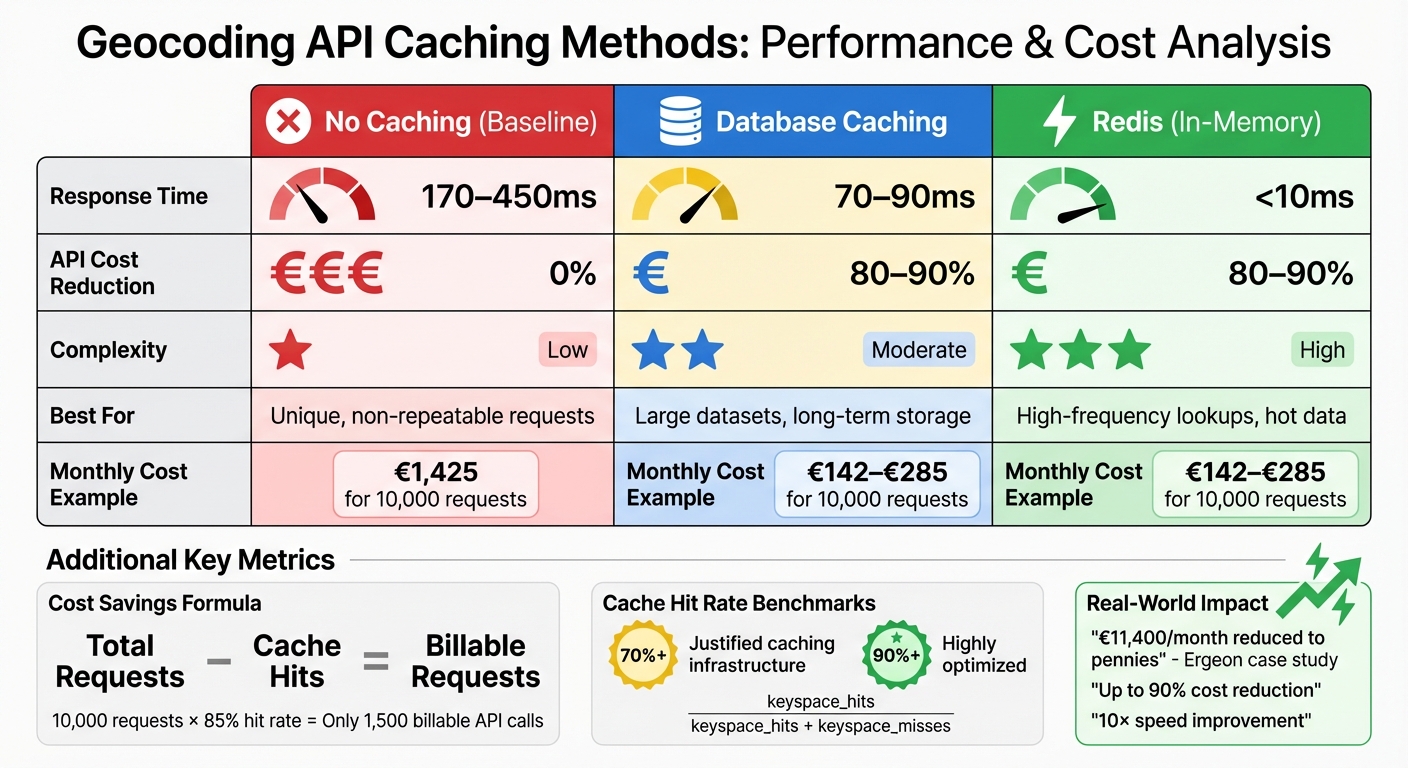
The formula for calculating cache hit rate is simple: Cache hit rate = Total Cache Hits / Total Requests. For Redis users, this can be determined using the ratio: keyspace_hits / (keyspace_hits + keyspace_misses). A hit rate above 70% generally justifies the use of caching infrastructure, while rates exceeding 90% indicate highly efficient optimization.
To monitor cache performance in real time, you can check response headers like X-Cache-Status or cf_cache_status, which show whether a response is a HIT, MISS, STALE, or BYPASS. However, as John Noonan from Redis points out:
"A cache hit ratio... is a useful signal, but an unreliable goal. A high hit ratio doesn't guarantee better performance, and chasing it can lead to wasted resources".
This highlights the importance of balancing your hit rate with metrics like eviction rates and query latency. The goal is to ensure you're caching the most relevant data, rather than focusing solely on hit rates. Once your cache is optimized, you can measure its impact by calculating the reduction in API usage.
Calculating API Usage Reduction
To measure cost savings, compare the number of requests served from the cache to those hitting the Zip2Geo API. The formula is straightforward: Total Requests - Cache Hits = Billable Requests. For instance, with 10,000 total requests per month and an 85% cache hit rate, only 1,500 API calls would be billed.
Zip2Geo's dashboard simplifies this process by letting you track request volumes and calculate savings. For example, with the Starter plan (€5.00/month for 2,000 requests), an 85% hit rate allows you to handle around 13,300 total requests within your quota. The Pro plan (€19.00/month for 20,000 requests) could support approximately 133,000 requests under the same conditions. This demonstrates how caching can significantly reduce costs while ensuring fast data retrieval for high-traffic applications.
Comparing Caching Methods
Different caching strategies come with their own set of trade-offs, balancing factors like response time, cost savings, and complexity. Here's a quick comparison:
| Caching Method | Response Time | API Cost Reduction | Complexity | Best For |
|---|---|---|---|---|
| No Caching | 170–450ms | 0% | Low | Unique, non-repeatable requests |
| Database Caching | 70–90ms | 80–90% | Moderate | Large datasets, long-term storage |
| Redis (In-Memory) | <10ms | 80–90% | High | High-frequency lookups, hot data |
Redis stands out for its ultra-fast response times (under 10ms), making it ideal for high-frequency lookups. However, it requires careful handling of memory and eviction policies to maintain efficiency.
Conclusion
The strategies outlined above highlight how caching can make a significant difference in geocoding efficiency. By caching frequently requested ZIP codes, geocoding shifts from being a recurring expense to a one-time cost. This simple yet effective approach can cut API costs by up to 90% and reduce response times from 170–450 ms to just 70–90 ms. In essence, smart caching not only trims expenses but also optimises the performance of your Zip2Geo plan.
Caching does more than save money - it also strengthens technical reliability. Even during API outages, your application can continue to serve location data, all while staying within standard rate limits (e.g., 3,000 queries per minute).
"Small inefficiencies at scale can become expensive, but thoughtful optimisation - grounded in data and careful design - can have outsized impact." - Rami Yakoub, Software Engineer, Ergeon
Choosing the right caching method tailored to your application’s needs is key. For high-frequency lookups requiring lightning-fast responses (under 10 ms), in-memory solutions like Redis are ideal. On the other hand, database caching works better for storing data that changes less often, such as ZIP code boundaries. To get the most out of caching, implement a time-to-live (TTL) policy of 30–90 days, monitor cache hit rates, and track the reduction in billable requests. After all, the fastest response is the one that doesn’t need to query the API at all.
FAQs
What TTL should I use for caching ZIP code geocoding results?
When caching ZIP code geocoding results, setting an appropriate TTL (Time to Live) is key to balancing data accuracy and cost savings. Most TTL durations typically range from just a few hours to several days. A common recommendation is to use a window of 24 to 48 hours, as this timeframe can help significantly cut down on API costs while still providing reasonably up-to-date geodata.
However, the ideal TTL depends on your application's requirements and how frequently the geocoding data is expected to change. If your use case involves rapidly changing geodata, you might need shorter cache durations. On the other hand, for more static data, longer TTLs may work just fine.
How do I prevent a cache stampede when a popular key expires?
To prevent a cache stampede when a highly requested key expires, you can use a mix of strategies like locking, request coalescing, or refreshing data early based on probability. Here’s how these approaches work:
- Per-key locking: This ensures that only one request is responsible for rebuilding the cache, while other requests either wait or use the stale data temporarily.
- Soft TTL with a grace period: This method serves stale data for a short time while the cache is refreshed in the background.
- Probabilistic early refresh: This spreads out the load by refreshing the cache at random intervals before it expires.
Using these strategies together can help maintain system stability and prevent overload.
Should I cache geocoding results in Redis, a database, or both?
Caching geocoding results in both Redis and a database strikes a balance between speed and reliability. Redis provides lightning-fast, in-memory caching for frequently requested data, helping to cut down on API expenses. On the other hand, a database ensures that cached results are stored persistently for long-term use. By combining Redis’s quick access capabilities with the durability of a database, you can achieve a setup that boosts performance while keeping costs under control.