Interactive API testing and static documentation are two key methods for understanding and working with APIs. Here's the difference:
- Interactive API Testing: Lets you test API calls in real-time, tweak parameters, and see live responses. It's hands-on, faster, and reduces errors by providing immediate feedback. Ideal for troubleshooting, quick implementation, and generating reusable code snippets.
- Static Documentation: Provides detailed, structured, and offline-accessible guides about API functionality. Best for understanding technical details, compliance needs, and offering a reliable reference.
Quick Overview:
- Interactive Tools: Faster execution, live feedback, updated automatically, higher initial cost.
- Static Docs: Offline access, deeper context, prone to becoming outdated, lower upfront costs.
Both approaches work best when combined. Interactive tools help you test and implement quickly, while static documentation offers deeper understanding and offline reliability.
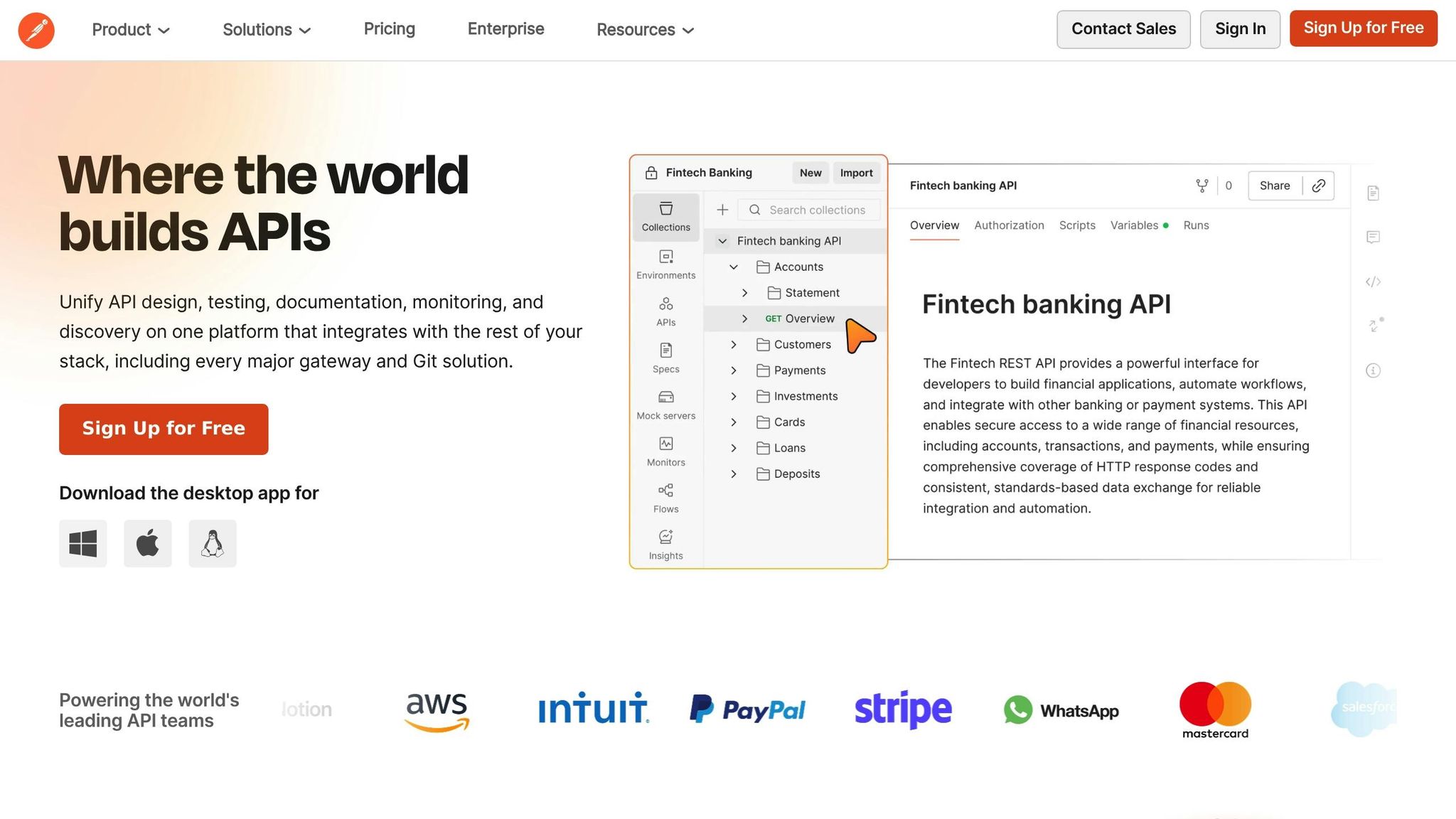
API Testing 3 ways: Postman, Playwright, and Jest Compared
sbb-itb-823d7e3
What Interactive API Testing Offers
Interactive API testing tools allow you to test endpoints, tweak parameters, and instantly view responses - all within the same interface. This eliminates the hassle of switching between tools or manually crafting requests elsewhere. Instead, you can configure and execute API calls directly in the documentation interface, streamlining the entire process. It's a hands-on approach that makes real-time testing and troubleshooting much more efficient.
The standout feature here is the immediate feedback loop. With real-time feedback, you can see response headers, status codes, latency, and even formatted 4xx/5xx errors, helping you quickly identify and fix issues like malformed requests. Many tools also offer session history tracking, so you can compare previous calls and pinpoint changes during debugging.
Real-Time Testing and Feedback
Interactive testing tools make troubleshooting faster by letting you test different parameters and authentication methods on the spot. Many of these tools come with pre-filled sandbox environments loaded with realistic sample data. This not only reduces the chances of manual errors but also speeds up the time it takes to make a successful API call.
The workflow is seamless: read the documentation, set up your request, and execute it - all without leaving the interface. This approach can boost developer productivity by 20–30% while cutting support inquiries by 30–60%. Considering that unclear API documentation can lead developers to spend up to 50% of their time on rework, interactive testing tools provide a much-needed solution. Additionally, these tools often sync automatically with the API's OpenAPI specification, ensuring you're always working with the most current information.
Beyond troubleshooting, interactive testing tools take it a step further by converting successful API calls into reusable code snippets, making it easier to integrate them into your projects.
Auto-Generated Code Snippets
Once you've successfully tested an endpoint, tools like Swagger UI and Apidog can generate ready-to-use code snippets in over 20 programming languages, including Python, JavaScript, and cURL. These snippets are tailored to your specific request, complete with the parameters you entered. In many cases, they even include embedded API keys, saving you the trouble of manually replacing placeholders.
This feature dramatically shortens the time it takes to go from reading API documentation to writing functional code. Instead of spending hours crafting requests, you can simply copy a generated snippet and integrate it into your project within minutes. It's a game-changer for developers looking to streamline their workflows and focus on building rather than debugging.
What Static Documentation Offers
Static documentation provides a well-organized, in-depth guide to understanding API functionality. Instead of focusing on immediate, hands-on testing, it lays out the technical details needed to grasp how an API operates from beginning to end. According to a Stack Overflow survey, 90% of developers rely on documentation and SDKs when working with APIs. This makes a well-structured static reference a cornerstone for any API's usability and success.
Readability and Structure
One of static documentation's strengths is its ability to present information in a clear, logical format. Many top-tier API docs, such as those from Google Maps and Vimeo, use a three-column layout: navigation on the left, content in the middle, and a table of contents on the right. This setup allows developers to quickly find the information they need without unnecessary backtracking.
This structured design minimizes mental effort by guiding users through a logical flow - starting with "Getting Started", moving through "Authentication", and then diving into specific endpoint references. Unlike interactive tools that focus solely on execution, static documentation provides the "why" behind API functionality, not just the "how." This context is especially important since developers often land on specific endpoint pages through search engines. A well-organized static reference ensures they immediately find the precise details they’re looking for.
Offline Accessibility
A key advantage of static documentation is its ability to function without an internet connection - something interactive testing tools can't offer. Tools like Redocly CLI allow developers to create standalone static HTML files that can be accessed locally, making the documentation portable and dependable. This is particularly useful for developers working in secure environments where online access is restricted.
Formats such as HTML, PDFs, or wiki pages provide a stable offline reference, making it easy to archive documentation for older API versions. This ensures that even legacy systems remain supported without relying on a live portal. When you need a dependable "Single Source of Truth" without the complexities of a live testing environment, static documentation steps in to fill the gap. Its reliability and structured approach make it an excellent companion to interactive tools, blending detailed guidance with practical usability.
Comparing Interactive API Testing and Static Documentation
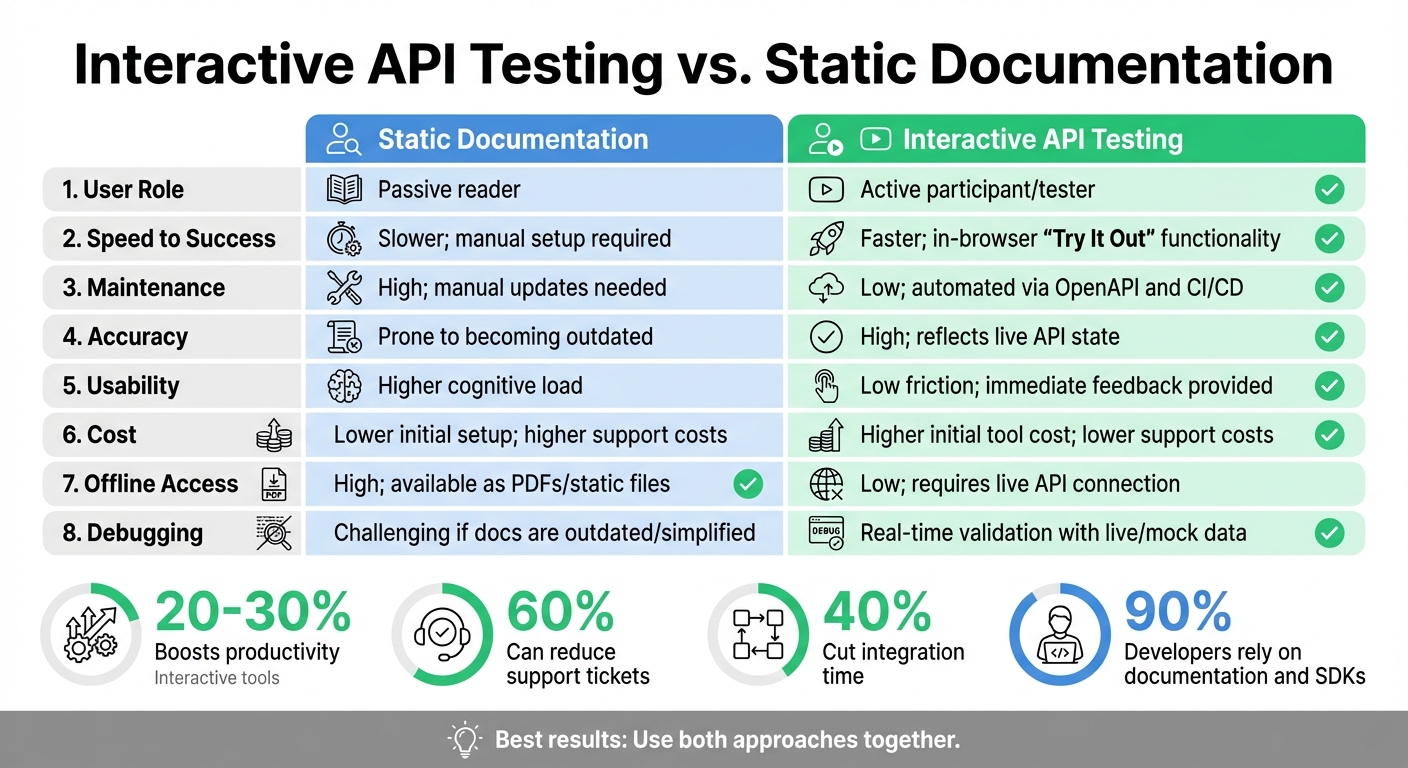
Interactive API Testing vs Static Documentation: Key Differences Comparison
Both interactive API testing and static documentation bring distinct advantages to API development, each catering to different needs and scenarios. Interactive documentation shifts the developer's role from passive reader to active explorer, enabling them to test endpoints and view real-time responses directly in the browser. On the other hand, static documentation acts as a reliable reference, offering in-depth explanations and offline accessibility.
When it comes to performance, the differences are striking. While static documentation often requires manual setup in external tools, interactive documentation significantly reduces the time-to-first-API-call by providing pre-configured authentication and live testing environments. This convenience can boost productivity by 20–30%. However, static documentation excels at explaining the reasoning behind API functionalities, offering much-needed context that interactive tools might overlook.
The maintenance aspect also highlights a sharp contrast. Static documentation is susceptible to "documentation rot", where it becomes outdated as the API evolves. Interactive documentation, however, is frequently generated from OpenAPI specifications and updated through CI/CD pipelines, ensuring it remains aligned with the production code. This automation can cut API-related support tickets by 60% and reduce integration time by 40%. That said, static documentation typically has lower upfront costs, while interactive platforms often come with higher SaaS fees.
"The biggest complaint that most devs have is that your API documentation is out of date compared to production." - Zuplo
The table below highlights the key differences between these two approaches:
Comparison Table
| Category | Static Documentation | Interactive API Testing |
|---|---|---|
| User Role | Passive reader | Active participant/tester |
| Speed to Success | Slower; manual setup required | Faster; in-browser "Try It Out" functionality |
| Maintenance | High; manual updates needed | Low; automated via OpenAPI and CI/CD |
| Accuracy | Prone to becoming outdated | High; reflects live API state |
| Usability | Higher cognitive load | Low friction; immediate feedback provided |
| Cost | Lower initial setup; higher support costs | Higher initial tool cost; lower support costs |
| Offline Access | High; available as PDFs/static files | Low; requires live API connection |
| Debugging | Challenging if docs are outdated/simplified | Real-time validation with live/mock data |
Ultimately, the choice between these methods isn't an either/or decision. A combined approach often works best: interactive tools address the "how" by enabling hands-on experimentation, while static documentation explains the "why" with detailed references and structured insights.
When to Use Each Approach
Choosing between interactive and static documentation isn't about one being better than the other - it's about aligning the approach with the specific needs of your API and its users. The right choice depends on factors like your API's complexity, your team's workflow, and what developers need to achieve.
When to Use Interactive API Testing
Interactive documentation shines when speed and hands-on exploration are essential. For APIs with multi-step workflows, state management, or complex authentication sequences, interactive guides can make a huge difference. Studies show that interactive tools that maintain session states between calls can boost successful implementation rates by 75%. Developers benefit from seeing how parameters interact in real time, avoiding the guesswork that often comes with static descriptions.
Interactive tools also help developers troubleshoot on the spot. Real-time response visualizers turn errors into opportunities to learn and adapt. As Jessica Jansasoy of ReadMe explains:
Your API documentation has one crucial job: getting developers to their first successful API call as quickly as possible.
For APIs requiring multiple headers, authentication tokens, or precise parameter setups, interactive consoles reduce the risk of copy-paste errors that often occur in static workflows.
Interactive testing is also a great tool for pre-sales evaluation. Prospective users can experiment with your API using sample data before committing to full integration, which can cut sales cycles by up to 30%. Many top API providers simplify this process by preloading credentials into examples, so developers can start testing immediately.
That said, there are situations where static documentation is the better fit.
When to Use Static Documentation
While interactive tools are great for real-time execution, static documentation offers advantages when context and deeper understanding are the priority. Beginners often need detailed explanations to grasp complex concepts, and static guides are better at walking developers through the "why" behind your API design, not just the "how" of making requests.
Static documentation is also critical for compliance and governance needs. Enterprises with strict branding or regulatory requirements often need full control over documentation presentation and versioning. Static formats allow for this kind of customization without relying on live API connections or third-party platforms.
For simple APIs with straightforward endpoints, static documentation can be more efficient. If your API primarily involves basic GET requests with minimal authentication, a clean reference page often meets developer expectations without the added maintenance of interactive tools. Experienced developers, in particular, may prefer static references when they just need quick access to specific technical details.
Another key advantage of static documentation is offline accessibility. Developers working in restricted environments, during flights, or in areas with unreliable internet still need to access API references. Static HTML files or PDFs meet this need in ways that browser-based interactive tools simply cannot.
Why Interactive Testing Works Well for Zip2Geo
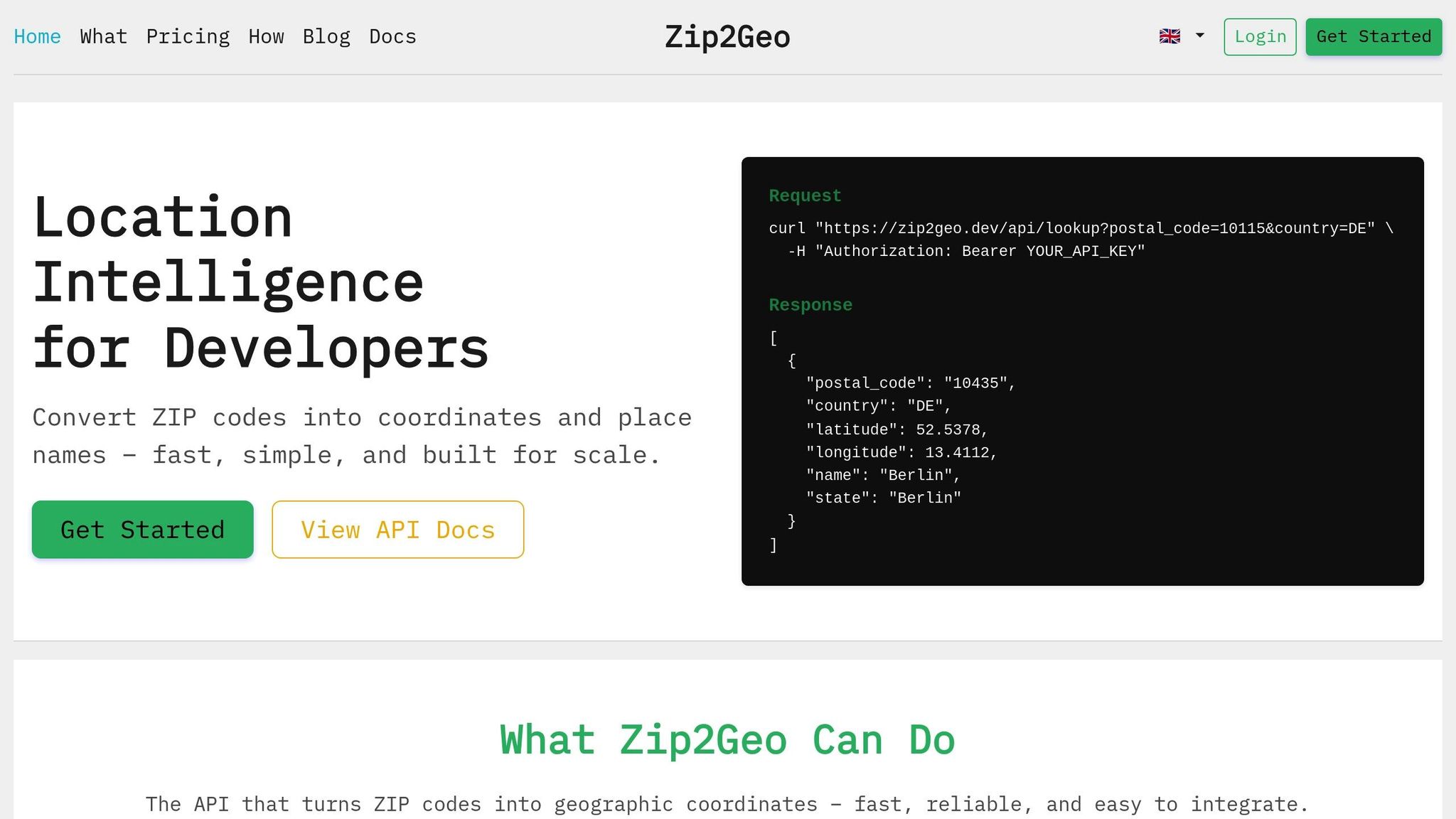
Zip2Geo's setup - RESTful endpoints, JSON responses, and a developer-friendly design - works perfectly with interactive API testing tools. The API provides structured geodata, such as latitude, longitude, city, state, and country, all in JSON format. These tools display the data with features like syntax highlighting and formatted views, turning what could be overwhelming raw data into clear, easy-to-read structures. This makes it much easier for developers to quickly interpret and use the information .
One standout benefit is the reduction in context switching. Developers don’t need to jump between multiple tools. They can test Zip2Geo directly in their browser, logging in once, entering a ZIP code like 90210, and instantly seeing the JSON response. This streamlined process cuts down the time it takes to get a working API call from hours to just minutes.
Interactive tools shine when it comes to real-time parameter adjustments, which is especially important for geodata APIs. Developers can see immediate results as they test different ZIP codes, try out edge cases with unusual postal code formats, or check how the API handles invalid inputs. With interactive documentation, developers can experiment directly in the interface, making hands-on learning much more effective.
Given Zip2Geo's global reach - covering over 100 countries - interactive testing is a game-changer for understanding regional differences. Developers can easily switch between German, US, or UK postal codes to see how the API structures data for each format. The auto-generated code snippets feature is a huge time-saver here, allowing developers to turn successful tests into ready-to-use Python, JavaScript, or cURL commands. These snippets even retain the specific parameters used during testing, such as regional postal code formats, making it easier to handle differences like administrative divisions in Germany versus the US.
On top of performance benefits, interactive documentation also eases the support workload. Research shows that self-service exploration can reduce API-related support tickets by up to 60% . Developers can test authentication, review error messages like 400 Bad Request for invalid ZIP codes, and experiment with rate limits - all within a safe sandbox environment. This enables them to troubleshoot and resolve issues on their own, without needing constant help from support teams.
How to Document the Zip2Geo API
Using Both Interactive and Static Documentation
To provide an optimal experience for developers, the Zip2Geo API documentation combines interactive tools with static references. This dual approach caters to different needs throughout the development process. Static documentation - such as Markdown-based guides, tutorials, and architectural overviews - covers essentials like authentication flows, rate limits, and global endpoints. Meanwhile, tools like Swagger UI allow developers to actively test the API by entering ZIP codes and receiving real-time JSON responses, including latitude, longitude, city, state, and country details.
By using the OpenAPI specification as the central source of truth, you can automatically generate both static and interactive documentation, ensuring consistency and avoiding outdated information. For seamless updates, integrate the OpenAPI spec into the CI/CD pipeline, so any changes to Zip2Geo’s geolocation logic are instantly reflected in both formats. Structure the content around user workflows instead of technical categories. For example, group endpoints under practical headings like "Converting a ZIP to Coordinates" to align with how developers approach their tasks.
Once this framework is in place, focus on implementing these principles using Swagger for a hands-on testing environment.
Setting Up Swagger for Interactive Testing
Transform RESTful endpoints into an interactive console where developers can test ZIP-to-geo conversions directly in their browser. Populate the console with real-world examples, such as 10115 (Berlin) or 90210 (Beverly Hills), rather than generic placeholders. This ensures developers receive a successful 200 OK response right away, significantly reducing the time it takes to achieve their first successful API call - from hours to just minutes.
Simplify authentication by allowing a single API key input to apply across all test calls, minimizing errors caused by placeholders. Additionally, enable auto-generated code snippets, which turn successful tests into ready-to-use implementation code. To prevent accidental data overwrites, configure toggles for switching between sandbox and production environments. Finally, use SwaggerHub’s permalink feature to let developers share direct links to specific operations, like the ZIP-to-geo endpoint, with their team members.
Conclusion
Interactive testing and static documentation serve different purposes, but together, they create a well-rounded approach to developer support. Static documentation provides structured and detailed explanations, covering topics like authentication processes, rate limits, and architectural choices. On the other hand, interactive consoles act as a practical sandbox, allowing developers to execute real API calls and observe the outcomes directly. The main distinction lies in usability: static documentation demands manual input, while interactive tools eliminate the need for switching contexts entirely.
Consider this: 89% of developers abandon APIs due to poor documentation. The solution isn’t about choosing one method over the other; it’s about integrating both effectively. Static guides explain the "why" and "what", while interactive tools show the "how" and confirm functionality in real-time.
Take Zip2Geo, for example. By pairing detailed static documentation with live API testing, they foster trust and simplify integration. Their static guides highlight the global reach of their location intelligence API, detailing data sources and coverage across 100+ countries. Meanwhile, their interactive console lets developers immediately test the API by entering ZIP codes - such as "10115" for Berlin - to receive a complete JSON response. This hands-on approach not only validates the API’s functionality but also accelerates deployment.
This dual strategy doesn’t just improve onboarding; it also simplifies troubleshooting. Developers often jump straight to specific endpoints through searches rather than reading documentation sequentially. By embedding both static instructions - like authentication details and base URLs - and interactive testing tools on the same page, developers get everything they need in one place. This transforms documentation from a static resource into an engaging, practical learning platform that caters to diverse user needs and experience levels.
FAQs
How do I keep interactive docs and static docs in sync?
To keep interactive and static API documentation aligned, it's smart to rely on a unified workflow built around a single source of truth - such as an OpenAPI schema. This approach ensures that any updates to the API are automatically reflected across both documentation formats.
You can generate static documentation directly from the schema while embedding interactive features within the interface. Tools like OpenAPI generators or deployment pipelines can automate updates, saving you from the hassle of manual adjustments and ensuring everything stays consistent.
When should I prefer static docs over a 'Try it out' console?
Static documentation works best when the information remains constant and doesn't require frequent updates. It's particularly useful for internal references, compliance guidelines, or any content where reliability is key. Since it doesn’t support real-time interaction or testing, it serves as a dependable and straightforward resource for users who need consistent information.
How can I offer interactive testing without exposing real data or keys?
To ensure secure API testing, consider using mock servers. These servers replicate the behavior of real APIs by providing static or dynamic responses, eliminating the risk of exposing sensitive data or access keys.
Another option is to leverage interactive documentation tools. Many of these tools include features like 'Try-It' consoles or sandboxes. These environments use mock data or tokenized access, enabling safe testing without jeopardizing production data or security credentials.